For actuarial & insurance advisory firms

Win More Actuarial Consulting Clients With AI-Powered Business Development.

CRMCoPilot helps actuarial and insurance consulting firms identify organizations that match their expertise, research key decision-makers, and develop targeted, personalized outreach campaigns.

Free plan with 5 verified leads a week · No credit card · Native CRM connections on paid plans

  • Actuarial consultancies
  • Employee benefits consultants
  • Pension & retirement advisors
  • Risk & insurance analytics firms
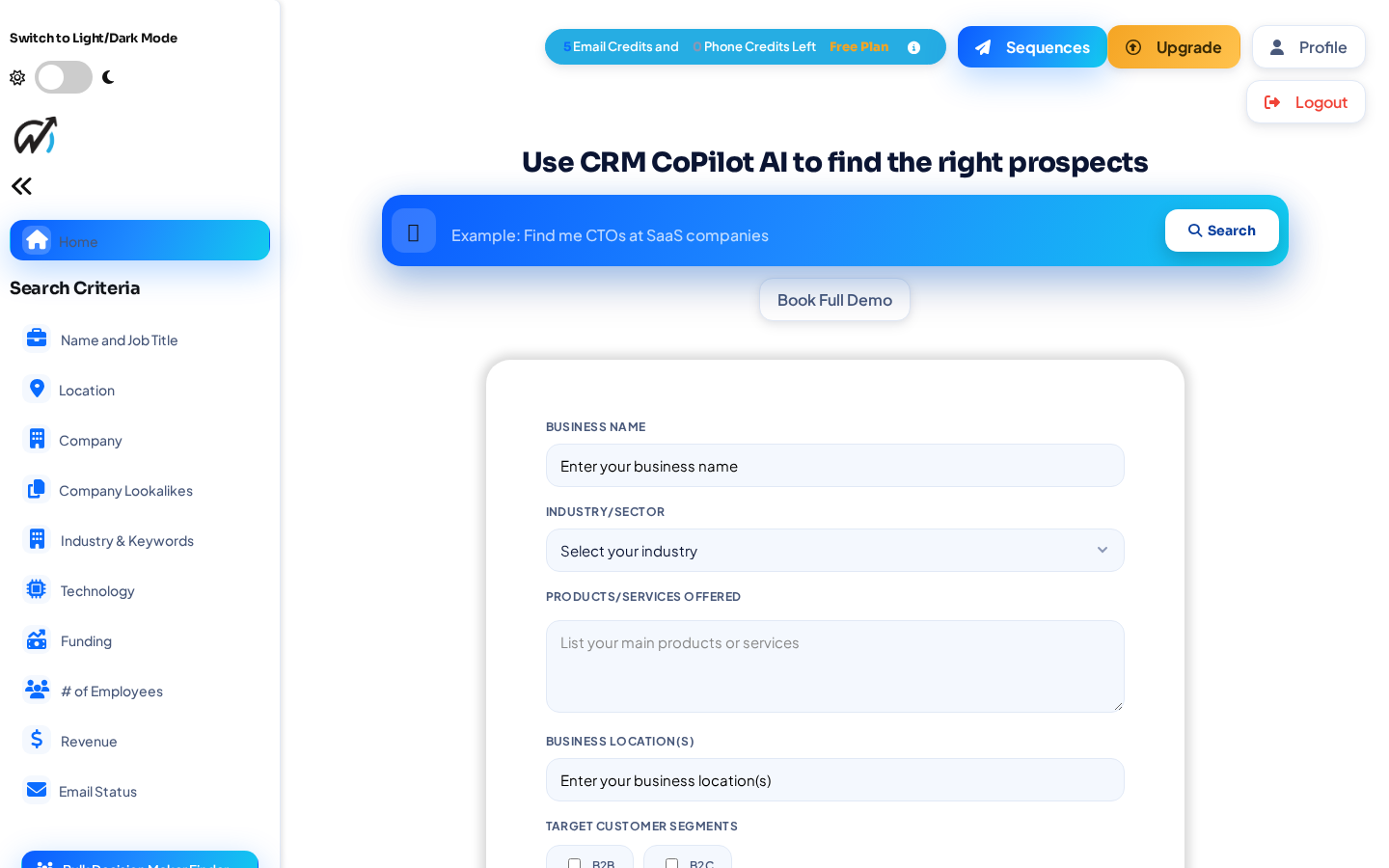
CRMCoPilot search screen with a plain-English prospect search bar, filter sidebar and an ideal-customer form
Actual CRMCoPilot product screen.

The problem

Why business development is hard for specialist firms

Precise targeting matters

Your services fit a small set of carriers, payers and plan sponsors. Volume prospecting doesn't help.

Research takes senior time

Understanding a carrier's lines and structure before reaching out takes hours.

Actuaries deliver and sell

The same people run valuations and build relationships, and deadlines win.

Long, relationship-driven cycles

Engagements take months of trust-building and well-timed follow-up.

Conference contacts go cold

Business cards from industry meetings rarely turn into an organized follow-up plan.

Information is scattered

Prospects live in spreadsheets, inboxes and a CRM that nobody updates.

Professional judgment stays with your teamCRMCoPilot supports business development. It doesn't perform actuarial analysis, give regulatory advice or replace the relationships your consultants build.

How it works

From ideal customer to first reply in six steps

  1. Define your ideal customer

    Describe who you sell to in plain English, then refine with filters and the products or services you offer.

    In actuarial consultingDefine target organizations: carriers, reinsurers, TPAs, health plans or plan sponsors, by size and region.

  2. Let AI discover matching prospects

    Search a licensed company and contact database, the public web and Google Maps. Fit scoring ranks results against what you sell.

    In actuarial consultingSearch finds matching organizations, ranked against your practice areas.

  3. Identify decision-makers

    Filter by job title, seniority and people new in their role. Decision-maker search is on paid plans.

    In actuarial consultingFind chief actuaries, CROs, CFOs, benefits directors and analytics leads.

  4. Review and enrich

    Emails are checked for deliverability before use. Unlock a work email for 1 credit, only when one is found.

    In actuarial consultingUnlock verified emails and read AI research on each organization before you reach out.

  5. Connect to your CRM

    Native connections to GoHighLevel, Zoho CRM, Pipedrive, HubSpot and Salesforce, with duplicate checks by email and company domain.

    In actuarial consultingSend accounts and contacts to your CRM, with an owner assigned to each partner.

  6. Launch personalized outreach

    AI drafts research-backed emails and video scripts. Sequences send from your Gmail and stop when a prospect replies.

    In actuarial consultingSend considered, partner-reviewed outreach and follow-ups that stop on reply.

AI agents for actuarial consulting

Four agent workflows to set up for your team

These are workflows you configure in CRMCoPilot, not ready-made templates. Each card shows what's available today.

Available nowa shipped feature does thisBuild it todayset up from search, scoring and AutopilotPartly availablesee the note on the card

Build it today

Insurance Company Prospect Finder

Your expertise fits specific types of insurance organizations.

Runs a saved search for carriers, reinsurers, administrators, insurtechs or health payers by size and region, ranked against your practice areas.

Example input
Regional P&C carriers and mutuals, 200–2,000 employees, in the Midwest
Expected output
Target organizations with available decision-makers

Built with: Saved search + fit scoring

Build an agent for this workflow →
Build it today

Actuarial Decision-Maker Finder

Engagements are bought by a small number of senior leaders.

Finds contacts by title at each target account and flags people new in their role.

Example input
Chief Actuary, Chief Risk Officer, CFO, VP Actuarial, Benefits Director
Expected output
Decision-maker profiles with verified professional emails

Built with: Title + new-in-role filters (decision-maker search on paid plans)

Build an agent for this workflow →
Partly available

Regulatory & Industry Opportunity Research Agent

Regulatory and market changes create reasons to talk.

Researches each target organization from public sources, with citations, so your outreach can connect to topics such as reserving, reporting or plan valuation.

Example input
A target carrier + the regulatory topic your team specializes in
Expected output
Research notes and an outreach angle for an actuary to review

Built with: AI research on individual prospects

There's no continuous regulatory monitoring. CRMCoPilot doesn't make legal, regulatory or actuarial determinations. Your professionals do.

Build an agent for this workflow →
Available now

Actuarial Business Development Agent

Partners need follow-up to happen without sounding like a mass campaign.

Drafts research-backed emails based on your specialization and the prospect's situation, and runs follow-up sequences that stop on reply.

Example input
Contact + practice area + conference or research context
Expected output
Draft outreach, prospect research and CRM-ready contacts

Built with: AI research and pitch + sequences + CSV import (paid plans)

Start using this today →

Turn Conference Relationships Into an Organized Business Development Pipeline

Illustrative workflow. You bring the contacts you met; CRMCoPilot helps you research, organize and follow up.

  • CaptureImport the contacts you collected yourself, such as badge scans or business cards, from a CSV. CRMCoPilot doesn't import attendee lists or access private conference databases.
  • ResearchLook up each organization and find the other decision-makers at that account.
  • OrganizeSend contacts to your CRM under the right account and partner, with checks for existing records by email and company domain.
  • Follow upPrepare a relevant, partner-reviewed follow-up sequence that stops when someone replies.

Integrations

Works with the CRM and inbox you already use

GoHighLevelNative · several locations on Gold+Zoho CRMNative · plus CRM Focus on Gold+PipedriveNative connectionHubSpotNative connectionSalesforceNative connection
GmailSend sequences and track replies
Meet AlfredLinkedIn campaigns via your own account
CSV & webhooksImport, export and custom workflows

Sending leads to a CRM, sequences and LinkedIn campaigns need a paid plan. See all integrations.

Example

An account-based plan for 40 health plans

Illustrative scenario, not a customer story

A healthcare actuarial practice wants to deepen relationships with regional health plans over two quarters.

  1. Searches for regional health plans and payers with 300–5,000 employees in its target states.
  2. Picks 40 accounts and finds the chief actuary, CFO and head of analytics at each.
  3. Imports 25 contacts the partners met at a recent industry meeting from a CSV.
  4. Reviews AI research on each plan and writes outreach tied to the practice's pricing and reserving work.
  5. Sends accounts to the CRM under the responsible partner, with low-volume sequences that stop on reply.

An organized account list with research and partner-led follow-up, without treating specialist services like a volume campaign.

Ways to work with us

Do it yourself, or have our team help

Self-service

Free plan, then from $99/month

  • You configure searches, agents and Autopilot
  • AI finds, ranks and verifies leads
  • You run outreach from your own Gmail and CRM
Compare plans

Managed

Your own account, from $1,500/month

  • Everything in Platinum
  • Our team builds and tunes custom agents for your targets
  • Named account manager and help with your outreach
Talk to us about Managed

Done For You

No login needed, from $750/month

  • Our team runs outreach for you
  • Targeting set up for your market
  • Scope and reporting set by your service agreement
See Done For You

Results vary by market and offer.

Actuarial Consulting questions

Is this a mass email tool?

No. For specialist firms, CRMCoPilot works best for precise, account-based prospecting: a focused list of organizations, research on each one, and partner-reviewed outreach.

Can it import the contacts we met at a conference?

Yes. Import a CSV of contacts you collected yourself. CRMCoPilot doesn't pull conference attendee lists or access private attendee databases.

Does it monitor regulatory changes?

No. AI research looks up individual prospects from public sources and cites them. It doesn't monitor regulations or make regulatory or actuarial determinations.

Do I need an existing CRM?

No. You can search, review and run outreach inside CRMCoPilot. To send leads to a CRM, connect GoHighLevel, Zoho CRM, Pipedrive, HubSpot or Salesforce through a native connection; this requires a paid plan. Paid plans can also export a CSV.

Is email outreach supported?

Yes. Paid plans send multi-step sequences from your connected Gmail, with AI-written steps if you want them. Sequences stop automatically when a prospect replies, and unsubscribes, bounces and do-not-contact entries are respected. LinkedIn campaigns run through your own Meet Alfred account.

How does pricing work?

There's a free plan with 5 verified leads a week and no credit card. Paid plans start at $99 a month and add more credits, AI and Autopilot agents, CRM delivery and outreach. Managed plans start at $1,500 a month. See pricing for details.

Give your team a prospecting process that keeps running

Start on the free plan with 5 verified leads a week, or talk to us about your market first.

Other industries:

Shopping cart