
For GoHighLevel agencies
Fill every client's GoHighLevel pipeline from one account
Connect each client's location, give each client its own ideal-customer profile and Autopilot schedule, and let verified leads arrive in the right sub-account automatically.
Free plan with 5 verified leads a week · No credit card · Cancel any time · Autopilot agents are included in paid plans
Lead generation for clients shouldn't mean a spreadsheet per client
Most agencies still build prospect lists by hand: search a database, export a CSV, clean it, import it into each client's sub-account, repeat next week. CRMCoPilot replaces the export–clean–import loop.
- One account, many locationsConnect each client's GoHighLevel location from Settings.
- A profile per clientSave a search with each client's industry, geography, titles and company size.
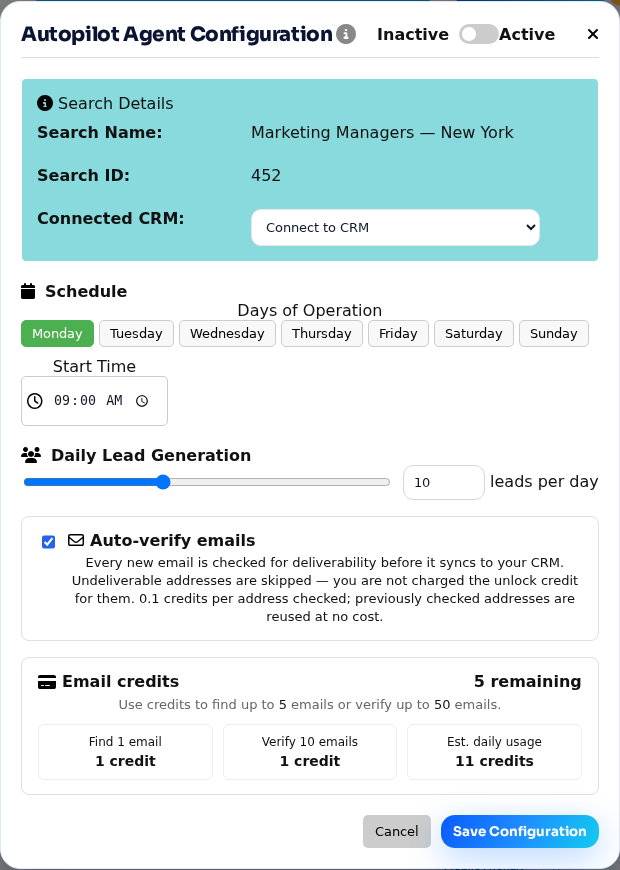
- Delivery on a scheduleAn Autopilot agent per client sends a set number of verified leads on the days you pick.
- Owner assignmentAssign new contacts to one user or round-robin across the client's team.
Set up a client in four steps
How agencies run CRMCoPilot
Connect the location
In Settings → Integrations, connect GoHighLevel and authorise the client's location.
Build the client's search
Describe their ideal customer and refine with filters. Add their products or services to rank results by fit.
Create an Autopilot agent
Choose the client's location as the destination, the days, start time and leads per day.
Leads arrive in their account
New contacts appear in the client's location, ready for their workflows and follow-up.
What's available now, and what's next
We'd rather you know exactly what you're buying.
| Capability | Status |
|---|---|
| Connect multiple GoHighLevel locations to one account | Available |
| Destination chosen per search or per Autopilot agent | Available |
| Email verification before sync; no charge for undeliverable emails | Available |
| Duplicate check by email and company domain before export | Available |
| Mix CRMs across clients (GoHighLevel, Zoho, Pipedrive, HubSpot, Salesforce) | Available |
| Check every connected CRM for an existing relationship and owner before creating a record | Planned |
| Client logins and per-client reporting | Not available |
Agency questions
How many GoHighLevel locations can I connect?
You can connect multiple locations to one CRMCoPilot account and choose the destination for every search or Autopilot agent. Plan limits on credits and Autopilot agents still apply; see pricing.
Can each client have a different ideal customer?
Yes. Each saved search and Autopilot agent has its own filters, schedule, daily volume and destination, so one client's dentists in Ohio never end up in another client's roofing pipeline.
What lands in the client's GoHighLevel account?
A new contact in the selected location with the prospect's name, title, company, location and verified email, plus a phone number if you unlocked one.
Can my clients log in to CRMCoPilot?
Today the agency runs CRMCoPilot and clients see the results in their own GoHighLevel location. Separate client logins are not available yet.
Do you resell or white-label?
Not today. If that matters to your agency, tell us; we're prioritising agency features with early customers.
Set up your first client this week
Start free, connect one client's location, and watch verified leads arrive.