
AI prospecting for your CRM
Qualified prospects, delivered into the CRM you already run.
Describe who you sell to. CRMCoPilot finds matching companies and decision-makers, scores them against your offer, verifies their emails, and sends them to GoHighLevel, Zoho CRM, Pipedrive, HubSpot or Salesforce — on demand or every day on Autopilot.
Free plan with 5 verified leads a week · No credit card · Cancel any time
How it works
From “who do we sell to?” to leads in your pipeline
Tell it who you sell to
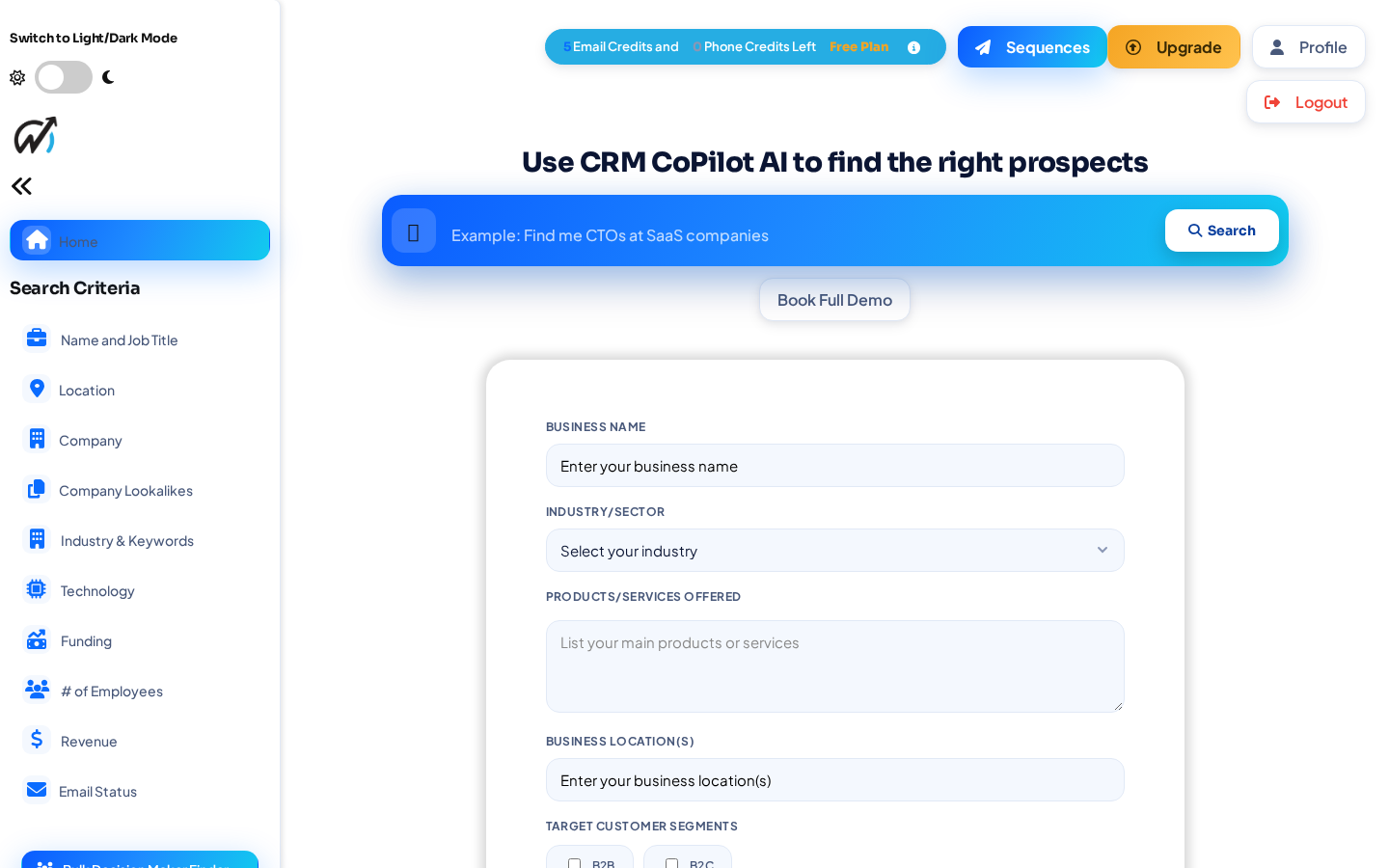
Type a search like “marketing managers at SaaS companies in Texas”, or add your products and services so results are ranked by fit.
Review scored, verified prospects
Filter by title, industry, revenue, headcount, technology used, funding and new-in-role. Buying signals and a fit score show who to contact first.
Send them to your CRM
Push selected leads in one click, or save the search as an Autopilot agent that delivers new verified leads on a schedule.
What you get
Less list building. Cleaner CRM data.
Search in plain language
Describe your ideal customer in a sentence, then narrow with filters for location, company, lookalike companies, industry, technology, funding, headcount and revenue.
Fit scoring and buying signals
Leads are ranked against the products and services in your profile, and flagged for growth, recent funding or a new role.
Verified before it syncs
Emails are checked for deliverability. Undeliverable addresses are skipped, so they never reach your CRM or cost you an unlock credit.
Autopilot delivery
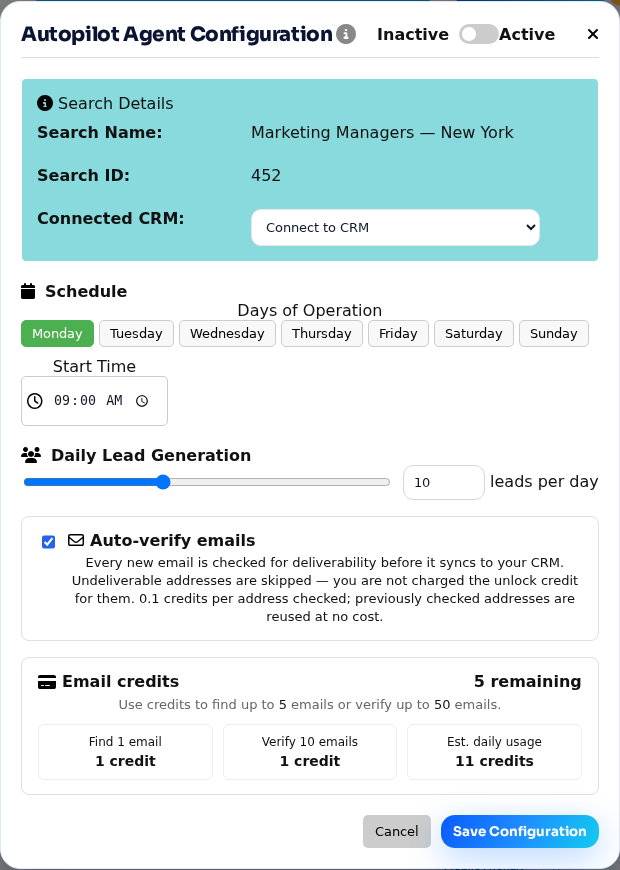
Choose days, start time and leads per day. New leads arrive in your CRM assigned to one owner or round-robin across your team.
Duplicate checks
Before export, CRMCoPilot checks for existing records by email and company domain.
Follow-up sequences
Send multi-step email sequences from your connected Gmail. A sequence stops the moment a prospect replies.
Integrations
One prospecting layer for every CRM you run
Connect several CRMs, or several GoHighLevel locations, at once. Find a prospect once and send it where it belongs.
Autopilot
Fresh, verified leads in your CRM every morning
- Runs on your schedulePick the days, the start time and how many leads per day.
- Goes to the right placeEach agent has its own destination CRM or GoHighLevel location.
- Verifies as it goesAuto-verify is on by default; failed runs refund export credits.
Autopilot is included in paid plans.
Prospect for every client from one account
Connect each client's GoHighLevel location, give every client its own Autopilot agent and ideal-customer profile, and let verified leads land in the right sub-account without manual imports.
Early customers
Built with a small group of early customers
We're a young product working closely with the businesses and agencies who use it. That means you talk to the people building it, and your feedback shapes what ships next.
What's shipped recently
- AI email sequences that stop on reply
- Buying signals, fit scoring and a technology filter
- Email verification built into Autopilot
- Several CRMs connected at the same time
Start free. Upgrade when it's working.
The free plan includes 5 verified leads every week. Paid plans add credits, Autopilot agents and team features for individuals, sales teams and agencies.
Questions
Where does CRMCoPilot's data come from?
CRMCoPilot searches a licensed company and contact database. Emails are checked for deliverability before they reach your CRM, and you only spend credits on contacts you unlock.
Which CRMs does it connect to?
GoHighLevel, Zoho CRM, Pipedrive, HubSpot and Salesforce, each through a native OAuth connection in Settings. You can connect several at the same time. For any other system, download leads as CSV.
Can an agency connect more than one GoHighLevel location?
Yes. Connect each client's location, then choose the destination for every search or Autopilot agent, so each client's leads land in their own account.
What is Autopilot?
An Autopilot agent runs a saved search on the days and time you choose, verifies new emails, and delivers a set number of leads per day into the CRM you pick, assigned to a fixed owner or round-robin. Autopilot is included in paid plans.
How do credits work?
Unlocking an email uses 1 credit and a phone number uses 5. Verifying an email costs 0.1 credit, addresses already checked are reused at no cost, and undeliverable emails found by Autopilot are skipped without charge.
Will it create duplicates in my CRM?
Before exporting, CRMCoPilot checks for existing records by email and company domain. We also recommend keeping your CRM's own duplicate rules switched on.
Is there a free plan?
Yes. The free plan includes 5 verified leads every week and needs no credit card. Paid plans add more credits, Autopilot capacity and team features; see pricing.
What about privacy and outreach rules?
B2B outreach is regulated (for example CAN-SPAM and GDPR). Send only relevant business messages, include an opt-out, and honor removal requests. Email sequences stop automatically when a prospect replies.
See your first qualified leads today
Create a free account, run a search, and send your first verified leads to your CRM.
Free plan with 5 verified leads a week · No credit card · Cancel any time