

Messy CRM data wastes time and money. AI fixes this.
Sales reps spend only 35% of their time selling because of poor CRM data. Inconsistent records like "Google Inc." vs. "Google LLC" lead to errors, unreliable forecasts, and failed integrations. AI automates this process, saving teams 8–12 hours weekly by cleaning, validating, and merging data in real time.
Key Benefits:
- Saves Time: AI reduces manual cleanup, which can take 1,667 hours for 50,000 records.
- Improves Accuracy: AI achieves 97% precision and 95.5% recall in merging duplicates.
- Prevents Errors: Standardizes fields like company names, job titles, and phone formats.
- Fixes Integration Issues: Ensures data consistency across tools like marketing platforms.
Instead of quarterly cleanup marathons, AI handles data continuously, keeping your CRM accurate and up-to-date.
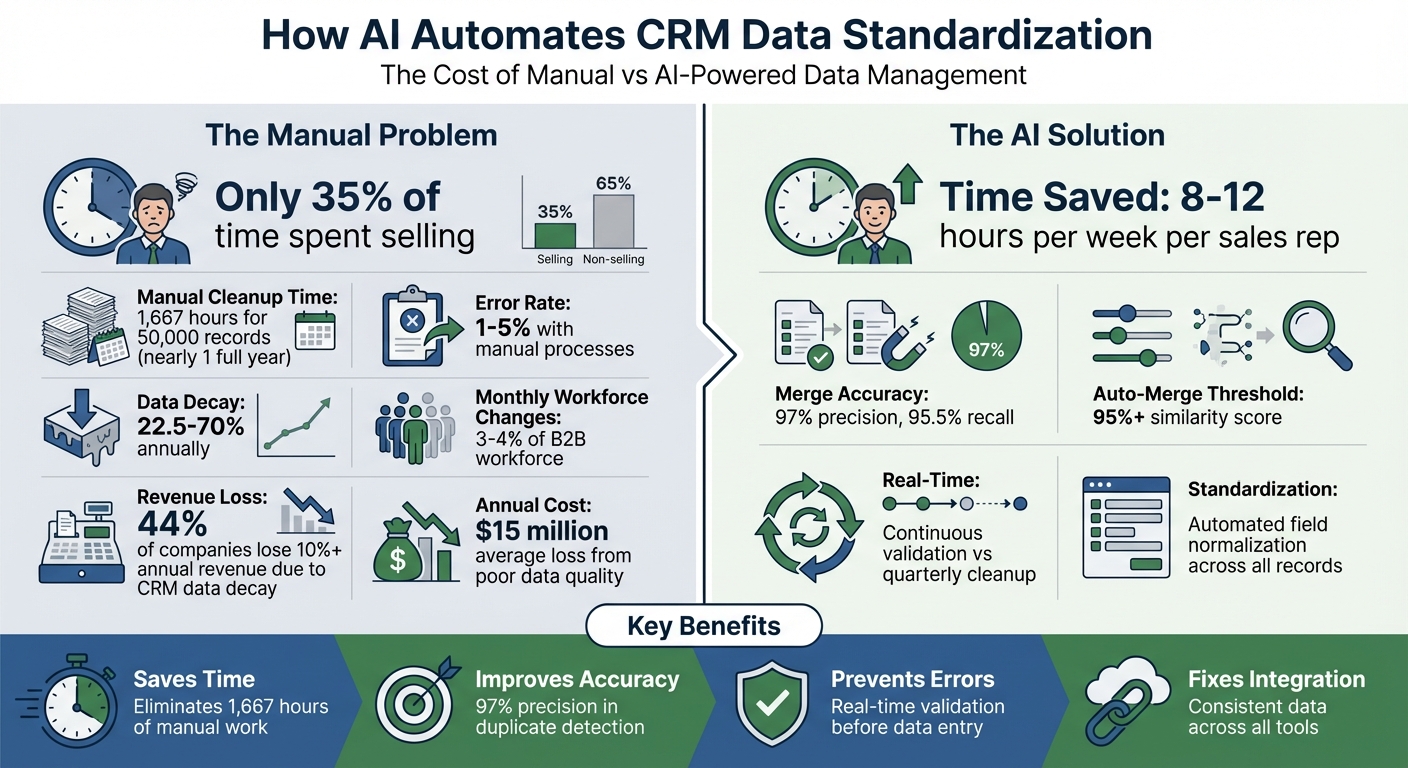
AI vs Manual CRM Data Standardization: Time Savings and Accuracy Metrics
AI in CRM: The Guide to Smarter Customer Relationships
sbb-itb-0ae5139
Problems with Manual CRM Data Standardization
While AI tools can standardize data instantly, manual methods often fall short, creating more headaches than solutions. Manual CRM data cleanup drains time, money, and resources, with poor data quality costing businesses an average of $15 million annually [6][7]. Despite these challenges, many teams still rely on outdated manual processes that can’t keep up with the demands of modern sales operations.
Slow Data Cleanup
Manual standardization is painfully slow. Imagine a mid-sized company with 50,000 records. If it takes just two minutes to clean up each record, that’s 1,667 hours of work – nearly an entire year for one person [7]. And by the time the cleanup is finished, much of the data is already outdated.
This issue only grows as databases expand. With 3–4% of the B2B workforce changing jobs every month [7], CRM data decays at alarming rates – between 22.5% and 70% annually [7]. Manual processes can’t keep pace, leaving sales reps with only 35% of their time for actual selling [5]. The result? Missed opportunities and a constant uphill battle against outdated records.
Worse still, the longer it takes to update data, the higher the risk of introducing errors.
Frequent Errors
Mistakes are inevitable with manual data entry. Studies show that manual processes have an error rate of 1% to 5% [7], which quickly adds up in large databases. For example, one rep might enter "VP Sales", another might type "V.P. of Sales", and a third might leave the title blank altogether. These inconsistencies wreak havoc on reporting, fragment account histories, and make accurate segmentation nearly impossible.
Duplicates are another major issue. Records like "Google", "Google Inc.", and "Google LLC" may slip through, confusing predictive scoring algorithms. Instead of identifying a high-priority account, the system might flag them as separate low-activity records. This leads to inaccurate priority lists and wasted outreach efforts. And despite spending over an hour daily on manual data entry, as reported by 32% of sales reps [6], the results are often unreliable, eroding trust in the system.
On top of errors and inefficiencies, inconsistent data causes major headaches when integrating systems.
Integration Problems
Standardized data is crucial for connecting CRMs with other tools like marketing automation platforms, billing systems, or analytics software. Without it, integrations often fail. For example, one system might use "United States" while another uses "USA", leading to mapping conflicts and duplicate records that require constant manual fixes.
The impact is massive. Forty-four percent of companies report losing more than 10% of their annual revenue due to CRM data decay [7]. A significant portion of this loss comes from integration failures that corrupt data as it moves between systems. When sales reps lose trust in the CRM, they often resort to personal spreadsheets to track contacts. This creates isolated data silos and leaves management in the dark. Instead of streamlining operations, poorly integrated tools end up adding to the chaos, further frustrating teams and stalling growth.
How AI Automates CRM Data Standardization
AI tools are transforming how CRM data is standardized, addressing the inefficiencies of manual processes. These tools scan various sources in real time – like emails, LinkedIn profiles, call transcripts, and meeting notes – for validation and standardization [2][4]. By automating these tasks, sales reps save between 8 to 12 hours each week [4], allowing them to focus more on closing deals rather than tedious data entry.
The process relies on techniques like deterministic, probabilistic, and phonetic matching. Deterministic matching works for exact identifiers, such as email addresses and phone numbers. Probabilistic matching, on the other hand, handles typos and variations. For example, algorithms like Levenshtein Distance and Jaro-Winkler can identify that "Jon Smyth" and "John Smith" likely point to the same individual [10]. Phonetic matching groups names that sound similar – like "Smith" and "Smyth" – to ensure updates align with the correct master record. This dynamic system integrates data capture, duplicate resolution, and field validation into a seamless workflow.
AI-Powered Data Capture and Standardization
AI excels at pulling contact details from unstructured sources like email signatures, calendar invites, and LinkedIn profiles. Once extracted, it standardizes the information before saving it to the CRM [2][4]. For instance, phone numbers in formats like (555) 123-4567, 555.123.4567, or +1-555-123-4567 are all normalized into a single structure. Similarly, variations of company names – such as "Google Inc.", "Google LLC", and "Google" – are unified [1][2].
Validation happens in real time. Before data enters the CRM, AI checks email deliverability and phone number accuracy to prevent errors from contaminating the database [2]. It also keeps tabs on external updates – like job changes on LinkedIn or company acquisitions – and updates the CRM automatically to avoid data becoming outdated [2].
Duplicate Detection and Merging
AI identifies duplicate records by analyzing multiple fields simultaneously and assigning confidence scores to potential matches. Records with a 95% or higher similarity score are auto-merged, while borderline cases are flagged for manual review [10][11]. This method balances automation with careful oversight, especially for high-value accounts.
When merging records, AI uses "golden record" rules to prioritize factors like data completeness, recent activity, or the trustworthiness of the source. All related activities – such as meeting notes, email threads, and opportunity histories – are consolidated into the master record, ensuring a full customer view [8][9].
"Duplicates are a governance issue disguised as a data issue. If you don’t operationalize prevention, detection, review, and merge decisions as a living workflow, duplicates will reappear." – EverWorker [8]
Beyond resolving duplicates, AI refines data further by standardizing and validating every detail.
Field Normalization and Validation
AI enforces consistency across fields, ensuring that job titles, addresses, and dates adhere to CRM standards [1][2]. It continuously monitors data quality, flagging incomplete records and maintaining field accuracy. Some systems even embed quality checks into sales workflows. For example, a deal might not progress to the "Proposal" stage until AI verifies the decision-maker’s contact details [2]. This ensures sales teams always work with reliable and complete information.
Step-by-Step Guide to Implementing AI Data Standardization
Before diving into AI tools, it’s essential to audit your CRM data. Start by exporting your data and calculating the fill rate for each field. This step helps identify incomplete fields and prioritize the ones that matter most – like verified emails, industry classifications, or employee counts [12]. Instead of enriching every field indiscriminately, focus your AI setup on the data that directly impacts business decisions. Here’s how to configure your AI tool for systematic data enrichment.
Step 1: Configure AI Tools for Data Capture
Tackling manual standardization begins with configuring your tools correctly. First, create a mapping document that links AI sources to your CRM field API names. For example, map "Company Size" to Company_Size__c and specify whether it’s a dropdown or text field [12]. This step helps avoid formatting errors during data transfers.
Next, establish overwrite and protection rules to safeguard critical information. For instance, manual entries from sales reps or recent product signup data should remain untouched by AI, while older data (18+ months) can be updated [12]. Integrate with systems like Google Workspace or Microsoft 365 for seamless, automated contact creation [4]. Additionally, configure a 10-minute delay after lead creation to allow the AI to complete enrichment and deduplication tasks before assigning leads [11]. Test with 25–50 records, aiming for at least 80% field accuracy. Once testing is successful, roll out the configuration across your entire database [12].
"The problem isn’t enrichment itself. It’s that they never built a system. They treated enrichment like a project with an end date instead of infrastructure that runs continuously." – Jan, Databar [12]
Step 2: Enable Duplicate Detection and Resolution
A robust duplicate detection system is key. Use a three-tier workflow: auto-merge for high-confidence matches (above 95% similarity), a review queue for medium-confidence matches (70%–94%), and a do-not-merge category for distinct records [8][11]. Start with deterministic matching, relying on exact identifiers like email addresses and domains to build trust. Gradually expand to fuzzy matching for names and subsidiaries [8].
Define "golden record" rules to resolve conflicts – for example, prioritizing sales-entered data over marketing-enriched data for specific fields [8]. For high-risk scenarios, such as records with open opportunities or strategic account data, require manual review before merging [8].
Step 3: Automate Data Validation and Integration
Once duplicates are under control, shift your focus to automating data validation and integration. Set up entry-point validation to check email deliverability and phone number formats before data enters the CRM [2]. Introduce quality gates that block deals from advancing to stages like "Proposal" unless critical fields are verified [2].
For large-scale standardization, process data in batches of 5,000 records to monitor for API errors or sync issues [12]. Always export a full CSV backup before enabling automated overwriting or merging [12]. Budget approximately $500–$2,000 per month for ongoing maintenance [12].
How CRM Copilot.AI Handles Data Standardization
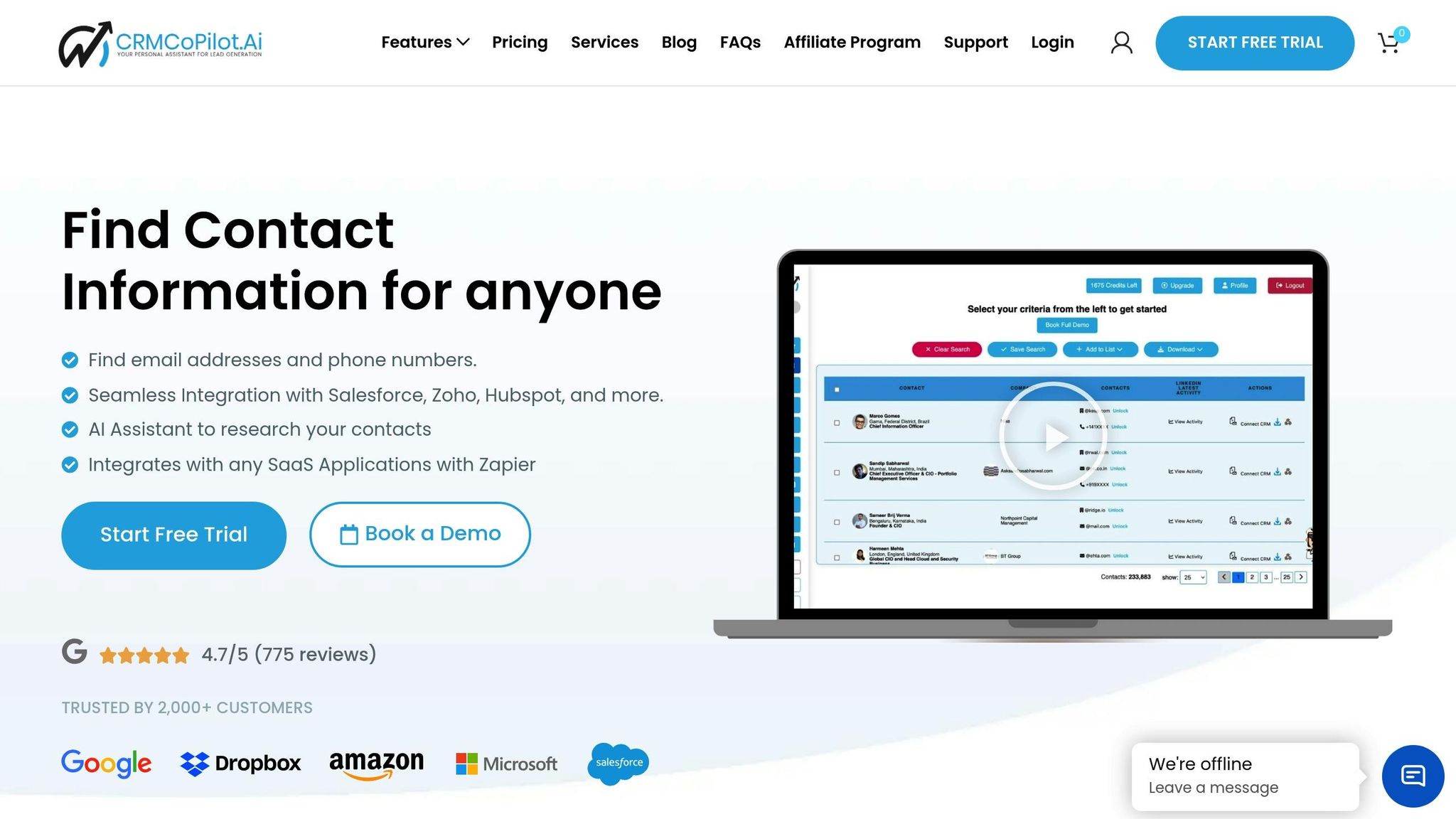
CRM Copilot.AI makes sure your data stays consistent right from the start by blocking any records that don’t meet your set standards. Its Autopilot feature automates lead capture by using predefined search criteria – like Contact Name, Title, or Location – to ensure only leads that meet your filters make it into the system [13]. This reduces the chances of manual errors, like copy-paste mistakes or formatting inconsistencies.
Key Features for Data Standardization
The platform combines real-time data verification with an AI Assistant that researches and validates contact details before syncing them to your CRM. With native integrations for popular tools like Salesforce, Zoho CRM, and HubSpot, it also ensures automatic data updates [14].
Autopilot works daily, pulling in a specific number of leads that align with your team’s workload [13]. Each lead is enriched with verified details, especially focusing on decision-makers, before triggering CRM workflows.
Practical Use Cases
Sales teams rely on CRM Copilot.AI to keep field formatting consistent across thousands of records. By setting up precise criteria in saved searches, they can ensure every new lead meets the required standards – like verified email formats, complete contact details, and proper classifications. This clean data also feeds directly into Salesforce Analytics dashboards, allowing teams to track lead sources and conversion rates in real time, without the hassle of manual cleanup.
These tools fit seamlessly into existing CRM processes, making it easier to manage data while preparing for smooth pricing and deployment.
Pricing Plans
CRM Copilot.AI offers four pricing options:
- Free Plan: Includes 240 email credits per year for basic lead generation.
- Silver Plan: Costs $55/month and provides 1,800 email credits, 150 phone credits annually, and advanced search filters.
- Gold Plan: At $95/month, it adds CRM integration, LinkedIn Smart Crawl, 3,600 email credits, and 240 phone credits per year.
- Platinum Plan: Priced at $250/month (billed annually), this plan delivers enterprise-level automation, 7,200 email credits, 480 phone credits annually, and full AI-powered workflow capabilities.
Conclusion
AI-powered data standardization is reshaping CRM management by cutting out the tedious manual tasks that eat up hours each week. Instead of dedicating 8 to 12 hours weekly to data entry and cleanup [4], sales teams can redirect their energy toward what really matters – building connections and closing deals.
But the value goes beyond just freeing up time. Clean, standardized data ensures that forecasts, pipeline reports, and analytics are grounded in reliable information, not bogged down by duplicates or inconsistent formats. With 37% of CRM users reporting lost revenue due to poor-quality data [15], the risks of inaction are hard to ignore. AI tools step in to prevent these pitfalls by validating contact details in real time, normalizing job titles, and eliminating duplicate records before they cause problems.
"AI transforms CRM data management from eliminating manual entry to predicting customer behavior." – Sean O’Connor, monday.com [3]
This automated, always-on approach ensures your data stays accurate as contacts change roles or switch companies. Instead of relying on quarterly cleanup sessions, AI keeps your database fresh and up-to-date. Considering that B2B data decays at a rate of over 2% per month [16], manual updates simply can’t keep up. AI agents quietly work in the background, ensuring every record reflects the latest information without constant human effort.
For teams looking to save time, improve accuracy, and create reliable forecasts, AI-driven standardization offers real, measurable results: fewer errors, faster outreach, and decisions based on trustworthy data.
FAQs
What CRM fields should I standardize first?
Start by ensuring that key contact fields – such as phone numbers, email addresses, and names – are formatted consistently. This step is essential for maintaining accurate records, facilitating smooth communication, and validating leads effectively. When these fields are standardized from the beginning, it reduces the chances of errors, enhances the overall quality of your data, and streamlines automation processes.
How does AI avoid merging the wrong duplicates?
AI uses advanced machine learning models paired with fuzzy matching algorithms to prevent incorrect duplicate merges. These algorithms excel at identifying near-matches and subtle differences in data fields such as names, emails, and phone numbers. By blending fuzzy matching with rule-based validation (like requiring exact matches for emails) and entity resolution, AI ensures that only actual duplicates are merged. This approach minimizes errors and helps maintain accurate, reliable CRM data.
How do I roll out AI standardization without breaking integrations?
To bring AI standardization into your systems without causing integration hiccups, focus on using standardized interfaces and strong integration frameworks. Begin by thoroughly mapping out your data and workflows to pinpoint any potential challenges. Then, introduce AI tools incrementally – tools like those from CRM Copilot can be a game-changer. They handle tasks like data cleaning, normalization, and validation while syncing effortlessly with CRMs like Salesforce or HubSpot. Always start by testing in a staging environment to ensure everything runs smoothly and maintains data integrity.