
If a sales tool fails on consent, access, logging, sharing, retention, or deletion, I would not approve it. That’s the whole test in one line.
Sales teams touch personal data every day – from email consent records to call recordings and billing details. A weak tool can lead to fines, lost deals, and brand damage. In this article, I boil the review down to a simple pass/fail check built around the six areas that matter most.
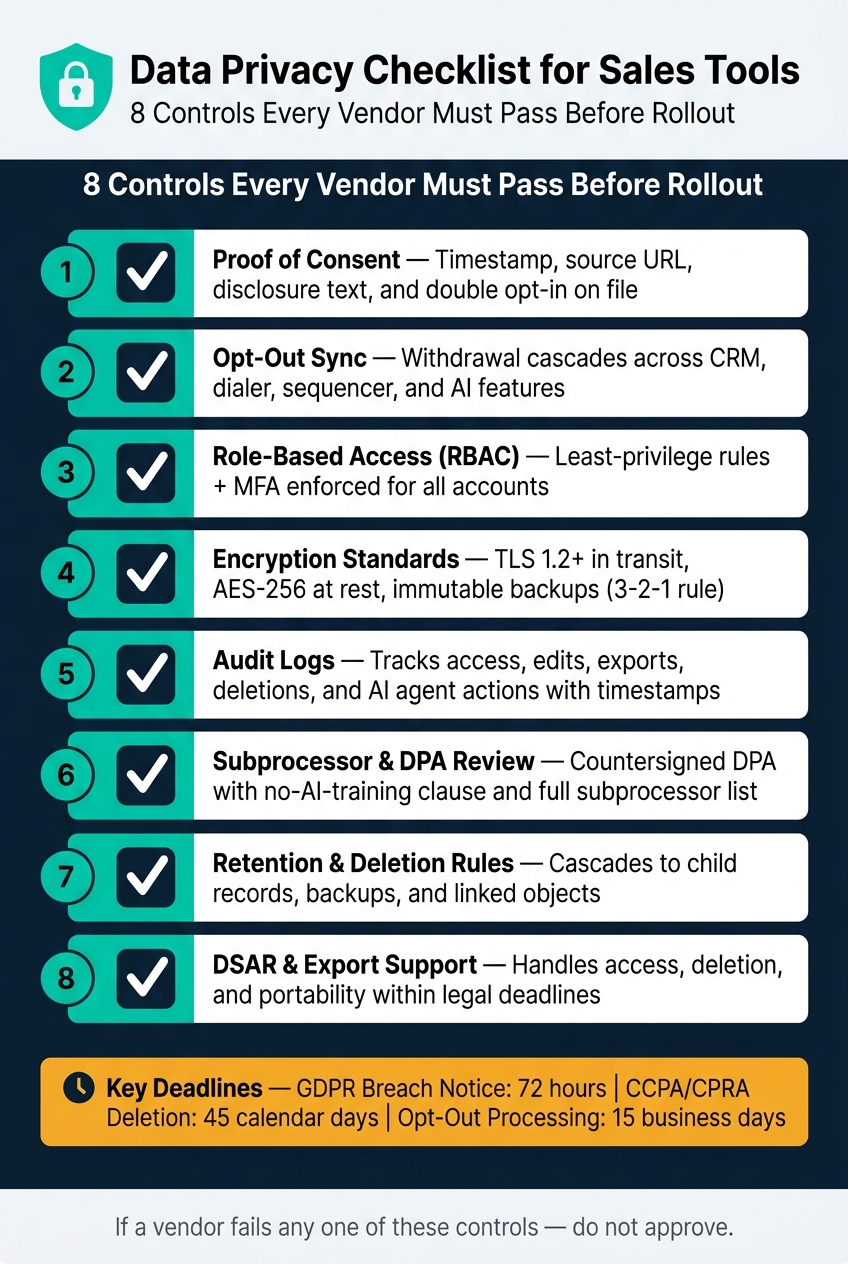
Before I move any vendor forward, I look for:
- Proof of consent with timestamp, source, and disclosure text
- Opt-out sync across the CRM, dialer, sequencer, and AI features
- Role-based access with MFA and fast account removal
- Encryption for stored data, traffic, and backups
- Audit logs for exports, edits, deletions, and AI actions
- Subprocessor and DPA review, including no-training terms
- Retention and deletion rules that also cover child records and backups
- DSAR and export support for access, deletion, and portability requests
A few facts make this review hard to skip: GDPR breach notice can be 72 hours, and CCPA/CPRA deletion requests can run on a 45-day deadline. If a vendor cannot show written proof for these controls, I treat that as a fail.
This piece gives me a plain checklist I can use during procurement, contract review, and rollout prep – before user data goes into the system.
Data Privacy Checklist for Sales Tools: 8 Must-Have Controls
A Critical Update on Data Privacy for Marketers: Act Now to Avoid Steep Fines
sbb-itb-0ae5139
Checklist 1: Data Collection, Consent, and Purpose Limits
Start by checking what the tool collects and whether that scope is kept under control.
Consent Capture, Records, and Withdrawal
A sales tool must store proof of consent: the contact’s IP address, source URL, a second-level timestamp, and the exact disclosure language shown at the time of agreement [7]. Those details are what make a consent record defensible.
| Consent Record Field | What to Verify |
|---|---|
| Proof Method | Double opt-in, web form, or E-SIGN-compliant signature on file |
| Timestamp | Second-level timestamp, not just the date |
| Scope | Each seller or entity named, not a generic "partners" list |
| Withdrawal Status | Cascades across the CRM, email sequencer, dialer, and any AI layer |
Once those records are in place, check that the tool isn’t collecting more data than the outreach use case calls for.
Pay close attention to opt-out propagation. This is where teams often get tripped up. A contact opts out of email, but that update never reaches the dialer, CRM, or an AI system using the same record. That’s fragmented suppression, and it’s a common weak spot. Every connected system must reflect the updated status on its own [7][4]. Withdrawal must be as easy as consent [5].
Consent forms also need to name each seller or entity covered by the agreement. A vague "partners" list doesn’t cut it. Check your vendor’s consent forms before you sign anything [7].
After consent is documented, the next step is simple: look at whether the tool limits what it stores.
Preference Management and Data Minimization
For B2B cold prospecting, collect only name, work email, job title, and company [2]. If the tool stores more than that, there should be a written reason. If there isn’t, that data probably shouldn’t be there.
Look for field-level controls that let admins keep nonessential PII out of prompts and logs [3][6]. If you’re using CRM Copilot.AI, review which fields its enrichment pulls and limit search filters to approved data only.
Here’s the practical test: if a field isn’t needed for outreach, leave it out of capture, enrichment, and prompts. Review the CRM’s default settings carefully. Turn off unneeded defaults, write down the purpose of each field you keep, and delete any field you can’t justify in one sentence [5]. That’s the point of data minimization: don’t collect data your team doesn’t need and can’t explain keeping.
Once collection is limited and consent is in place, review who can access the data and how that access is tracked.
Checklist 2: Access Control, Encryption, and Monitoring
Once data is collected, the next step is simple: check who can get to it, how it’s protected, and how activity is tracked.
Role-Based Access, MFA, and Fast Revocation
Skip the basic Admin/User setup. It’s too blunt for a sales tool that handles customer data every day. A better setup uses Role-Based Access Control (RBAC) to define exactly what each person can see and do [9][10].
Access should follow least-privilege rules. In plain English, users and AI agents should get only the permissions they need to do their job. For example, a sales rep may need access to Leads, but not Opportunities or Cases [12].
Multi-factor authentication (MFA) isn’t optional. It’s table stakes. Adaptive MFA goes a step further by adding risk-based checks for things like odd login attempts or bulk exports [9].
Access removal also matters. If someone leaves the company, changes roles, or loses approval, access should be revoked within hours, not days [10]. Look for SCIM support so the platform can sync with your identity provider and remove access automatically [11].
A few controls matter here:
- Use field-level security to hide sensitive fields from people who don’t need them, even when they can open the record [9][12].
- Bind AI agents to named permission sets instead of broad shared access [12].
- Log AI agent actions separately so you can tell human activity from machine activity [12].
Once access is locked down, move to encryption and key control.
Encryption at Rest, in Transit, and in Backups
Start with the basics. Require TLS 1.2+ for data in transit and AES-256 for data at rest [10]. If a vendor can’t confirm both, that’s a hard stop.
If you work in a regulated sector, dig deeper. Ask whether the vendor supports field-level encryption and Bring-Your-Own-Key (BYOK), so your organization keeps control of encryption keys [10].
Backups need the same level of care. Confirm that backups are immutable and follow the 3-2-1 rule: three copies, two different media types, and one offsite [10]. Also check that the vendor tests backup restoration at least quarterly [10]. A backup that hasn’t been tested is a bit like a spare tire you’ve never inflated.
| Feature | Standard Requirement | Advanced/Regulated Requirement |
|---|---|---|
| Encryption in Transit | TLS 1.2 | TLS 1.3 |
| Encryption at Rest | AES-256 (volume level) | Field-level encryption or customer-managed keys |
| Key Management | Vendor-managed keys | Bring-Your-Own-Key (BYOK) |
| Backups | Daily automated backups | Immutable backups (3-2-1 rule) |
Audit Logs and Alerts for Unusual Activity
Protection alone isn’t enough. You also need a record of what happened. Audit logs should show who did what and when.
That means every meaningful action should be logged: access, edits, exports, deletions, and permission changes. Each event should tie back to a specific user or, for AI features, a specific agent [11]. If the tool includes AI agents, the logs should also capture prompts, retrieved fields, model outputs, decisions, and user approvals, each with unique IDs and timestamps [6]. That record is what privacy reviews lean on.
Logging is only half the job. The system should also alert you when something looks off, such as:
- mass exports
- logins at unusual hours
- access to records a user has never viewed before
- admin privilege escalations [9][10]
It’s also smart to forward CRM audit logs to a SIEM for separate retention and alerting [10][3]. That way, if the CRM itself is compromised, you still have the logs. Set log retention based on your compliance needs [10][8].
Next, verify third-party sharing, deletion, and data-rights terms.
Checklist 3: Third-Party Sharing, Retention, and Data Rights
After access and logging, the next step is simple: follow the data. Where does it go? How long does it stay there? And who else can touch it?
Subprocessors, Data-Sharing Disclosures, and Breach Notice Terms
A lot of sales tools depend on outside vendors to process data. Because of that, the vendor should publish a full subprocessor list or give it to you when asked. That list should name each third party, explain what they do, show where they’re located, and state the lawful transfer mechanism in use [13][2]. Don’t treat this as one big checkbox. Treat each downstream processor as its own pass/fail item.
You also need a countersigned DPA. It should block AI training on your data and block sharing beyond the subprocessors listed in the agreement [2][8]. If the vendor can’t produce a countersigned DPA, stop there.
Breach notice terms need the same level of review. GDPR requires notice within 72 hours after a vendor becomes aware of a breach, while HIPAA allows up to 60 days [2][8]. Your contract should line up with the rule that applies to your data, not whatever default language the vendor happens to use.
Data residency matters too. You need to know where the data is stored and whether that location adds compliance risk. Check where the data sits and which transfer rules apply [2].
Retention Schedules, Deletion Workflows, and Export Support
GDPR says personal data can’t be kept longer than needed [14]. So retention should be set by data type, and stale records should be deleted on schedule.
Deletion is where things usually get messy. It’s not enough to delete the main record and call it done. Deletion needs to cascade across notes, activities, attachments, analytics copies, and backups [4][15]. Ask the vendor how this works in practice, and get the answer in writing. If they dance around it, that tells you plenty.
Export support matters for two reasons: portability requests and exit planning. Under CCPA/CPRA, deletion requests must be processed within 45 calendar days, and businesses must handle opt-out requests within 15 business days [2]. Your tool has to support those deadlines in day-to-day use, not just in contract language.
| Feature | Why It Matters | How to Verify |
|---|---|---|
| Retention settings | Prevents over-retention and supports jurisdiction-specific rules | Ask whether admins can set retention by object or record type |
| Auto-deletion | Makes sure records are removed on schedule without manual cleanup | Test a rule on stale test data and confirm it runs automatically |
| Linked deletion | Removes linked notes, activities, attachments, and related records | Request a demo of deletion on a parent contact and inspect child objects |
| Backup retention | Keeps deleted data from lingering in snapshots and backups | Review the backup retention schedule and deletion verification process |
| DSAR support | Enables access, correction, deletion, and portability requests | Check whether requests can be tracked, approved, executed, and logged |
| Legal-hold exception handling | Prevents accidental deletion of records under retention obligation | Ask how the system freezes records under legal hold or compliance hold |
| Machine-readable export | Supports portability and exit planning before deletion | Export sample records as CSV or JSON and confirm completeness |
| Deletion logs | Shows who deleted what and when | Review logs for deletion events, timestamps, and user IDs |
If retention rules block deletion, anonymize identifiers instead of holding on to personal data [15]. And if the data includes health information, a signed BAA is required, not just a DPA [8].
Use these retention and deletion terms as the final pass/fail inputs for rollout approval.
Checklist 4: Documentation, Team Fit, and Final Review
After you’ve checked access, encryption, and retention, there’s one more thing to lock down: the vendor needs to prove each control in writing.
Security Documentation and Incident Readiness
Before you approve any sales tool, ask for the full documentation package. A countersigned DPA is the starting point. You should also request a current SOC 2 Type II report from the last 12 months, an up-to-date subprocessor list, and a written incident response plan [2][19].
If the tool handles health data, a signed BAA isn’t optional. You need it in addition to the DPA [8].
For AI-powered platforms, read the DPA closely. It should state that customer data is not used to train foundation models [17][18]. That point matters more than many teams think. If the language is fuzzy, get it fixed before anything moves forward.
You’ll also want to confirm that Standard Contractual Clauses (SCCs) or a UK Addendum are in place for restricted cross-border transfers [16][17].
One more contract item deserves extra attention: the breach-notice deadline. Put the exact timing into the agreement [8][17]. If the vendor says something vague like "reasonable time", push back. That wording leaves too much room for delay.
Final Pass/Fail Checklist Before Rollout
Do one last review across every checklist in this article before onboarding even one user. This table ties each control area to a clear pass condition and a simple way to test it.
| Control Area | Pass Condition | How to Verify |
|---|---|---|
| Lawful basis | The tool can document consent or another lawful basis for each contact record | Review consent or legitimate-interest records [8] |
| MFA enforcement | MFA is mandatory for all accounts, not optional | Try a login without MFA; it should fail |
| Least-privilege access | No user holds "global read" or "Modify All Data" without documented justification | Audit users for unnecessary admin rights [10][19] |
| Deletion cascade | Deleting a contact cascades through connected records and systems | Run a test deletion and inspect connected systems [4][20] |
| Breach notification SLA | Vendor commits to notification within 72 hours in writing | Find the breach deadline in the DPA or MSA [8][16][17] |
| No-train clause | AI features cannot use customer data to train or fine-tune models | Confirm the no-train clause in the MSA [1][17][18] |
| Audit log forwarding | Logs export to a SIEM or can be retrieved independently | Export logs and verify independent retrieval [10] |
| Export format | Data exports in CSV or JSON for portability | Download CSV or JSON and check completeness [20][21] |
After that, tighten the basics:
Treat this checklist like a hard gate. If one item fails, fix it before rollout – not after.
FAQs
How can I verify a vendor’s consent records?
Ask for built-in consent management that tracks and records when consent was given, how it was collected, and what the user agreed to. The vendor should also offer clear, exportable audit logs for consent actions and opt-out requests.
Also review the Data Processing Agreement (DPA). Check how the vendor handles consent, how opt-out requests are processed within the required deadlines, and whether suppression lists are applied across all campaigns.
What should I ask about backup deletion?
Ask the vendor for its data deletion SLA in writing. That should spell out what happens during the contract and after it ends, so there’s no gray area once the relationship is over.
You’ll also want to confirm that deletion covers every system that holds your data, not just the main CRM database. That includes:
- Backups
- Analytics warehouses
- AI training corpora
On top of that, check whether the platform supports automated data retention limits. If live records are set to expire after a certain period, backups should follow the same deletion timeline too. Otherwise, deleted data may still hang around in other places long after it’s supposed to be gone.
Which privacy controls matter most before rollout?
Before rollout, lock down RBAC, least-privilege access, and MFA through SSO. Just as important, make sure your contract says the vendor can’t use your proprietary data to train AI models.
You should also set clear retention and deletion policies, mask or redact sensitive fields, and review API permissions. On the security side, check for certifications like SOC 2 Type II or ISO 27001.