AI is changing how businesses generate leads by turning CRMs into active tools that save time, improve accuracy, and boost sales results.
Here’s what AI-powered CRMs can do:
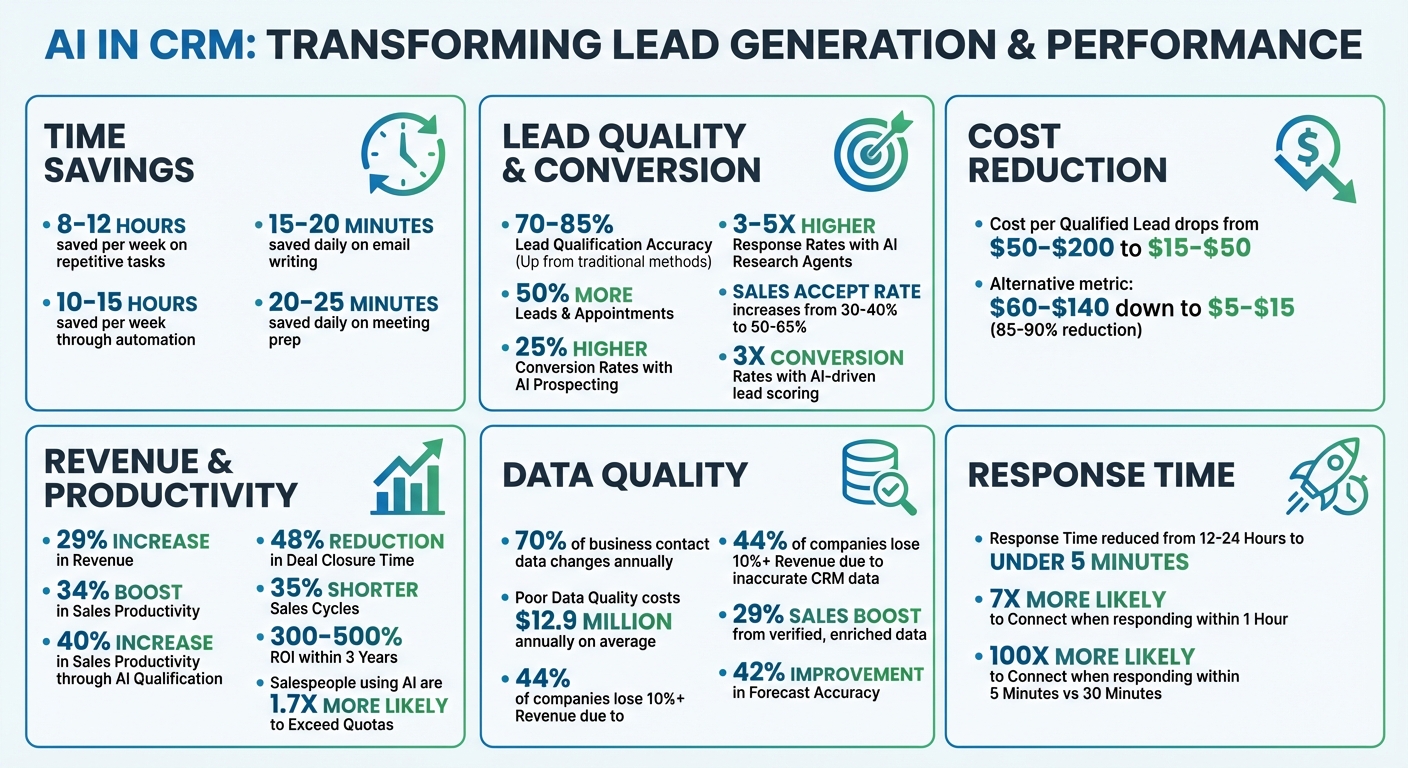
- Automate repetitive tasks like data entry and follow-ups, saving 8–12 hours per week.
- Score leads smarter by analyzing real-time data, improving qualification accuracy to 70–85%.
- Keep data accurate with real-time enrichment, reducing CRM errors that cost companies millions.
- Cut costs: AI reduces the cost per qualified lead from $50–$200 to $15–$50.
Companies using AI in sales report 50% more leads and appointments, and sales reps spend more time selling instead of managing data. Tools like CRM Copilot.AI integrate features like automated lead scoring, data verification, and personalized outreach, helping businesses close deals faster and more effectively.
Want to improve your CRM’s performance? Start by defining your Ideal Customer Profile (ICP), automate lead scoring, and use AI to personalize outreach at scale.
AI-Powered CRM Impact on Lead Generation: Key Statistics and ROI Metrics
AI Agents for Real-Time Lead Generation: Tools, Frameworks, & LLMs
sbb-itb-0ae5139
AI Features That Improve CRM Lead Generation
AI-powered CRMs aren’t just digital filing cabinets – they tackle the challenges that bog down sales teams. By automating tedious tasks, keeping data fresh, and helping teams zero in on high-value leads, AI transforms how businesses approach lead generation. Let’s break down how these features work.
AI Lead Scoring and Prioritization
Traditional lead scoring often relies on outdated, static rules, leaving sales teams guessing. AI flips the script by continuously analyzing interactions like website visits, email opens, content downloads, and even LinkedIn activity. It uses machine learning to predict which leads are most likely to convert, dynamically adjusting as new patterns emerge. This can slash lead qualification time by as much as 30% [3].
"Think of AI lead scoring as having a tireless analyst who… prioritizes leads based on genuine purchase likelihood, not gut feeling." – Taavid Mikomägi, Head of Growth, Sera [4]
The shift to AI for lead scoring is gaining traction. Gartner estimates that 60% of B2B marketers will adopt AI for this purpose by 2025, and companies using automated lead management have seen engagement jump by up to 25% [4]. Tools like CRM Copilot.AI integrate this technology directly into your CRM, ensuring your team focuses on leads with the highest potential.
Real-Time Data Enrichment and Verification
Data decay is a silent killer for CRMs – 70% of business contact details change within a year [5]. This leads to cluttered databases and costly inefficiencies, with poor data quality draining an average of $12.9 million annually from organizations. In fact, 44% of companies lose more than 10% of their revenue due to inaccurate CRM data [5][6].
AI steps in to keep CRM data accurate and up-to-date. For instance, when a new email address is added, AI enriches the record with details like job title, company size, and even buying intent signals. It also verifies contact information, such as email addresses and phone numbers, before they’re added to your system – helping reduce bounce rates and protect your sender reputation [5][7].
"Your CRM is lying to you. Not on purpose. But right now, most of the records sitting in your database are incomplete, outdated, or flat-out wrong." – Jaimin Kapadia, Leadsforge [5]
In fast-moving industries like tech, where data decay can hit 35% to 45% annually, this constant data refinement is a game-changer. Verified, enriched data doesn’t just clean up your CRM; it boosts sales by 29% and improves forecast accuracy by 42% [8]. Platforms like CRM Copilot.AI provide real-time monitoring to keep your database sharp as external conditions evolve.
Automated Manual Tasks
Sales reps spend too much time on admin work – only 35% of their day is left for actual selling [7]. AI tackles this inefficiency by automating repetitive tasks like lead assignment, follow-ups, outreach personalization, and even removing duplicate records [3][9][10].
This automation can save each sales rep 10–15 hours a week [9]. AI chatbots, for instance, engage leads instantly, 24/7, and can boost lead qualification rates nearly sevenfold when responding within an hour [3].
"Your sales team’s success no longer depends on how hard they work, but on how smart they work." – Victoria Landsmann, monday.com [9]
How to Set Up AI-Powered CRM Workflows for Lead Generation
Automate discovery, scoring, and outreach to let your team focus on closing deals. Here’s how to make it happen.
Define Your Ideal Customer Profile (ICP)
Before AI can identify the right leads, you need to define what "right" means. This starts with building a detailed Ideal Customer Profile (ICP). While traditional methods rely on basic firmographics like industry and company size, AI takes it further by incorporating a four-layer framework:
- Firmographic: Who could buy?
- Technographic: Who is equipped to buy?
- Behavioral: Who might be ready to buy?
- Intent: Who is actively searching for solutions?
This multi-layered approach helps AI uncover patterns that manual methods often miss, making your CRM’s lead generation smarter and more efficient.
Research shows that defining eight or more ICP criteria can triple your positive reply rates [11]. For example, instead of targeting "SaaS companies with 50–200 employees", you could refine your ICP to include technographic signals like "uses HubSpot" or behavioral triggers such as "recently hired their first SDR." Companies that recently secured funding are 2–3x more likely to invest in new sales tools within 60 days of closing a funding round [11].
"Training your AI agent on your ICP is the single highest-leverage activity in your entire lead generation setup." – MarkOps AI [11]
Start by analyzing your CRM data, focusing on patterns in both won and lost deals. AI tools excel at identifying subtle trends – like a shared tech stack or similar hiring patterns among your best customers – that might otherwise go unnoticed. And don’t forget to define negative ICP criteria as well, such as accounts likely to churn or those in industries with regulatory challenges [11][13].
Automate Lead Discovery and Scoring
With your ICP in place, it’s time to let AI handle lead discovery and qualification. AI-powered Finder agents can search databases to pull in qualified prospects directly into your CRM [11][1]. These agents also fill in missing details, such as revenue, tech stack, and verified contact information, ensuring your lead records are complete [14][15].
Next, set up a lead scoring model to prioritize prospects. Assign numerical weights to key signals. For example:
- +35 points for intent signals like visiting your pricing page
- +30 points for decision-maker titles
- +25 points for actions like attending a webinar
Using AI for lead qualification can boost sales productivity by 40% while cutting wasted effort by 60% [12]. AI processes thousands of leads each month with accuracy rates climbing from 60% to as high as 90% [14][15].
To streamline your workflow, configure automated alerts for high-scoring leads (e.g., scores above 70). These alerts can notify your sales team via Slack or email, ensuring they respond quickly. Acting within five minutes makes you 100 times more likely to connect with a lead compared to waiting 30 minutes [16].
Platforms like CRM Copilot.AI integrate these capabilities into tools like Salesforce, Zoho, and HubSpot. This allows you to automate lead discovery, enrichment, and scoring without needing to switch between systems. Once leads are scored and qualified, the next step is engaging them with tailored outreach.
Personalize Outreach at Scale
Generic outreach doesn’t work anymore. With AI handling ICP analysis and lead qualification, you can focus on crafting personalized communications. AI tools can generate tailored messages for email, LinkedIn, and other channels by referencing real-time data like recent funding news, new job postings, or LinkedIn activity [11][17]. The key is to use personalization prompts that address the specific needs of each ICP segment.
To keep things efficient, implement a multi-agent relay workflow:
- A "Finder" identifies prospects
- A "Scorer" qualifies them
- An "Enricher" fills in missing details
- An "Outreach Coordinator" creates and sends personalized messages
This seamless process eliminates manual handoffs. Companies using AI for sales prospecting report 25% higher conversion rates, with AI research agents achieving 3–5x higher response rates compared to traditional methods [1].
AI can also manage automated reply triage, categorizing responses as "Interested", "Objection", or "Out of Office", and drafting replies in under five minutes [16]. For complex deals, you can introduce a "human-in-the-loop" step where sales reps review AI-generated drafts before they’re sent [16]. This approach combines speed with quality, ensuring your outreach remains professional and effective.
To protect your primary email domain’s reputation, use secondary domains and allow a brief warm-up period [17].
Best Practices for AI-Driven Lead Generation
To make the most of AI-driven lead generation, it’s essential to combine smart engagement strategies, continuous performance monitoring, and technical safeguards. This ensures your campaigns are effective, efficient, and protect your outreach reputation.
Use Multi-Channel Engagement
AI thrives when used across multiple communication channels. The most successful campaigns connect with prospects through email, LinkedIn, and phone, ensuring you meet your audience where they’re most active. Timing also plays a key role – sending AI-generated emails during "Green" windows (usually between 8:30 and 10:30 a.m. in the recipient’s local time) increases the chances of engagement [16].
Tools like CRM Copilot.AI simplify this process by managing multi-channel engagement directly within platforms like Salesforce, Zoho, or HubSpot. With features like a unified inbox, your team can view and respond to messages from all channels in one place, speeding up response times and keeping conversations seamless [18][16][2]. Personalized AI emails, in particular, can achieve 29% higher open rates and drive a 41% increase in revenue [19].
"The best ‘hack’ is relevance." – Rajashree, Content Strategist [18]
Quick responses are critical. Companies that engage leads within one hour are 7 times more likely to have meaningful conversations with decision-makers [20]. Set up alerts in your CRM to notify your team via Slack or email when a high-value lead interacts with your outreach.
Monitor Campaign Performance
Tracking the right metrics is key to refining your AI models. Focus on KPIs that drive revenue, rather than vanity metrics, to gauge success. Here are some key benchmarks:
| Metric | Definition | Benchmark |
|---|---|---|
| Reply Rate | Percentage of recipients who reply | 5% – 10% |
| Positive Reply Rate | Percentage of replies that express interest | 40%+ |
| Cost-Per-Meeting | Total outbound costs divided by qualified meetings | $300 – $500 |
| Bounce Rate | Percentage of emails that fail delivery | < 2% |
Review these metrics weekly and adjust your models quarterly [21]. Look for false positives (leads that scored high but didn’t convert) and false negatives (leads that scored low but converted). These anomalies can highlight areas where your AI needs fine-tuning.
AI can also speed up the qualification process – reducing time by up to 30% – and companies using AI for lead management report up to a 50% increase in leads and appointments [9][22].
Maintain Compliance and Deliverability
Protecting your sender reputation is crucial for ensuring your emails land in inboxes. Start with the basics: configure SPF, DKIM, and DMARC records to verify your domain’s identity. Limit daily cold emails to 30–50 per inbox and scale volume by using multiple domains (2–3 domains with 4–6 mailboxes each) rather than overloading one address [16][18]. New domains should be warmed up gradually over 14–30 days, starting with just 5–10 emails per day [16].
Data quality is just as important. B2B contact data decays by 30–50% annually, so re-verify your CRM database every 90 days [1][16]. Use email verification tools to clean your lists, removing invalid addresses and spam traps. Platforms like CRM Copilot.AI offer real-time data verification to catch bad contacts before they harm your sender reputation.
Automate safeguards to block communication with anyone who has opted out or flagged your emails as spam. Ensure your AI respects communication preferences and adheres to regulations like GDPR and CAN-SPAM by implementing mandatory "cooling-off" periods [2][18].
"If your data is bad, AI is just going to magnify it and show how bad." – Tarun Sood, Chief Data and AI Officer, American Century Investments [22]
For sensitive interactions, consider using a "human-in-the-loop" approach. This allows AI to draft replies while sales reps review them before sending, striking a balance between speed and quality control [16][2]. This method ensures your outreach remains professional and compliant.
Measuring the Impact of AI on Lead Generation and CRM ROI
When you integrate AI into your CRM, tracking its performance is critical. Measuring the impact of AI helps fine-tune strategies and boosts ROI. AI-powered lead generation offers clear benefits, like saving time, increasing revenue, and providing strategic insights. Here’s how you can measure those gains.
Track Time Savings and Productivity Improvements
One of AI’s biggest perks is the time it frees up for your sales team. Before implementing AI tools, assess how much time your team spends on manual tasks like writing emails or preparing for meetings [25].
Post-AI deployment, track reductions in these tasks. For instance, AI can save 15–20 minutes daily on email writing and follow-ups, plus another 20–25 minutes on meeting prep [23]. Across a team of 200, this adds up to 4,000 hours saved each month. At an average hourly rate of $35, this translates to $3,200–$4,100 in annual productivity savings per team member [23].
AI also significantly reduces lead response times. Instead of taking 12–24 hours to respond, AI enables teams to engage with leads in under 5 minutes [24]. This faster "speed-to-lead" approach contributes to a 48% reduction in deal closure time [27].
| Metric | Baseline (Manual) | Target (With AI) | Impact |
|---|---|---|---|
| Response Time | 12–24 hours | < 5 minutes | Faster response |
| Qualification Volume | Baseline | +50–80% | Higher throughput |
| Sales Accept Rate | 30–40% | 50–65% | +15–25 points |
| Cost Per Qualified Lead | $60–$140 | $5–$15 | 85–90% reduction |
These improvements not only save time but also accelerate your revenue pipeline.
Calculate Revenue Growth and ROI
Revenue growth is the ultimate indicator of success. To measure your AI CRM ROI, use this formula: (Time Saved + Retention Value + Lead Quality Lift + Conversion Gain) ÷ Total CRM Cost [28].
Start by analyzing your sales velocity, which looks at how quickly deals move through the pipeline. The formula is: (Number of Opportunities × Win Rate × Average Deal Size) ÷ Sales Cycle Length [28]. AI can shorten sales cycles by 35%, speeding up revenue generation [26]. Additionally, monitor conversion rates, such as MQL-to-SQL and lead-to-opportunity, to see how well AI prioritizes high-value leads [28].
AI CRM tools deliver impressive returns, with a 300% to 500% ROI within three years [26]. Businesses using AI for lead management report up to a 50% increase in leads and appointments. AI-driven lead scoring can triple conversion rates [9] [26]. Plus, the cost per qualified lead drops dramatically – from $60–$140 down to just $5–$15, an 85–90% reduction [24].
"The revenue needle is the final reflection of dozens of micro-improvements: faster responses, smarter lead scoring, fewer lost opportunities, and stronger relationships that take time to mature." – Mariam Hameedi, Blazeo [28]
Compare your AI subscription costs ($150–$250 per user per month) to these gains to calculate your net ROI [26]. Be sure to include savings from reduced campaign management expenses and eliminated manual tasks [26].
Use Data Insights to Refine Strategies
AI does more than automate – it provides insights into what drives revenue. By analyzing trends in deal velocity, win/loss patterns, and engagement signals, you can focus on high-impact activities [27].
To ensure your AI operates effectively, maintain clean data. Set up a Data Quality Score in your CRM, evaluating completeness, accuracy, and recency. Only trigger resource-intensive workflows, like automated dialing, when a lead’s score exceeds 85/100 [29]. This is especially important since poor data quality costs businesses an average of $12.9 million annually [25] [29].
"Your AI is only as smart as the data you feed it, and most CRMs are serving up junk food." – Shawn Peterson, CEO, The Quantum Leap [29]
Establish feedback loops to improve your AI models. Regularly review forecasts and lead scores to compare AI predictions with actual outcomes [27] [9]. Teams that do this see a 47% boost in forecast accuracy and a 38% increase in win rates [30]. Use these insights to identify which sales strategies – like specific follow-up methods or meeting schedules – lead to closed deals, and replicate those across your team [30] [31].
Tools like CRM Copilot.AI offer real-time data verification and enrichment, ensuring your AI insights are based on accurate, up-to-date information. By tying prospecting activities directly to closed deals, you can pinpoint the campaigns that yield the best ROI and refine future efforts [31].
Conclusion
AI has reshaped the way CRM systems manage lead generation, turning them into powerful tools that automate tasks like data entry, lead prioritization, and personalized outreach – all in real time.
By integrating AI, sales teams are reclaiming up to 15 hours per week that were once tied up in administrative work [32]. Businesses are seeing noticeable increases in leads and appointments, leading to faster deal closures and improved conversion rates.
Switching from manual to AI-driven workflows doesn’t just save time – it drives revenue. Companies leveraging AI in CRM systems have reported a 29% increase in revenue and a 34% boost in sales productivity. Salespeople using AI are also 1.7 times more likely to exceed their quotas [33] [34]. These results highlight how AI not only streamlines processes but also delivers measurable financial gains.
CRM Copilot.AI is a prime example of this shift, offering features like real-time data validation, automated workflows, and integration with platforms such as Salesforce, Zoho, and HubSpot. Pricing starts with a free plan for basic lead generation and scales up to $250 per month for enterprise-level automation, making it adaptable to businesses of all sizes.
The evidence is clear: AI is revolutionizing CRM. The real question isn’t whether you should adopt AI for lead generation, but how soon you can implement it to stay ahead of the competition. Start by cleaning your data and defining your ideal customer profile. Let AI handle the heavy lifting, so your sales team can focus on what they do best – closing deals and driving revenue.
FAQs
How do I train AI lead scoring using my ICP?
To create an AI-driven lead scoring system tailored to your Ideal Customer Profile (ICP), start by feeding the model with data such as firmographics (company size, industry, location), behavioral patterns, and intent signals. Leverage AI tools for tasks like identity resolution (matching leads to the right accounts) and real-time data enrichment (adding missing or updated information to leads).
Train the model using historical lead data to establish patterns and benchmarks. Over time, refine the system by updating inputs and tweaking scoring criteria to reflect changes in your ICP. This approach helps ensure that your lead prioritization stays accurate and aligned with your business needs.
What data should AI enrich and verify in my CRM?
AI can play a crucial role in improving the quality of your CRM data by verifying and adding essential details. This means double-checking contact information like email addresses, phone numbers, and physical addresses to ensure they’re accurate. It also involves filling in gaps, such as missing job titles, company size, industry details, or intent signals.
Why does this matter? Accurate data helps weed out fake leads, saving your team time and effort. Enriching records with up-to-date information gives your sales team the tools they need to better target prospects, engage more effectively, and ultimately boost conversion rates.
How do I measure AI CRM ROI in dollars?
To figure out the ROI of AI-driven CRM in dollar terms, focus on measurable outcomes like improved lead conversion rates, boosted sales revenue, and cost savings through automation. Key metrics to track include extra revenue from AI-powered lead qualification and engagement, shorter sales cycles, and lower operational costs. To calculate ROI, simply subtract the total cost of implementing AI from these financial gains.