

If you need more accurate sales territories, AI usually wins on speed, coverage, and workload balance. Manual mapping can still work for small teams, but it often slows down once you have more reps, more accounts, or more midyear changes.
Here’s the short version:
- Manual mapping relies on spreadsheets, maps, and manager judgment
- AI mapping uses CRM data, rep capacity, win rates, and drive-time data
- Manual planning often takes 4–8 weeks
- AI-based planning can cut that to 3–5 business days
- Manual work may handle about 50–100 inputs at a time
- AI can process thousands of inputs
- Teams using territory optimization often see 2%–7% higher revenue
- AI-based territory programs report gains like 18% higher quota attainment, 33% lower rep mileage, and 22% more active selling time
- The tradeoff: AI usually needs cleaner CRM data and added software spend, often starting near $500/month
If I had to put it simply: manual mapping is easier to start, while AI is better for scale.
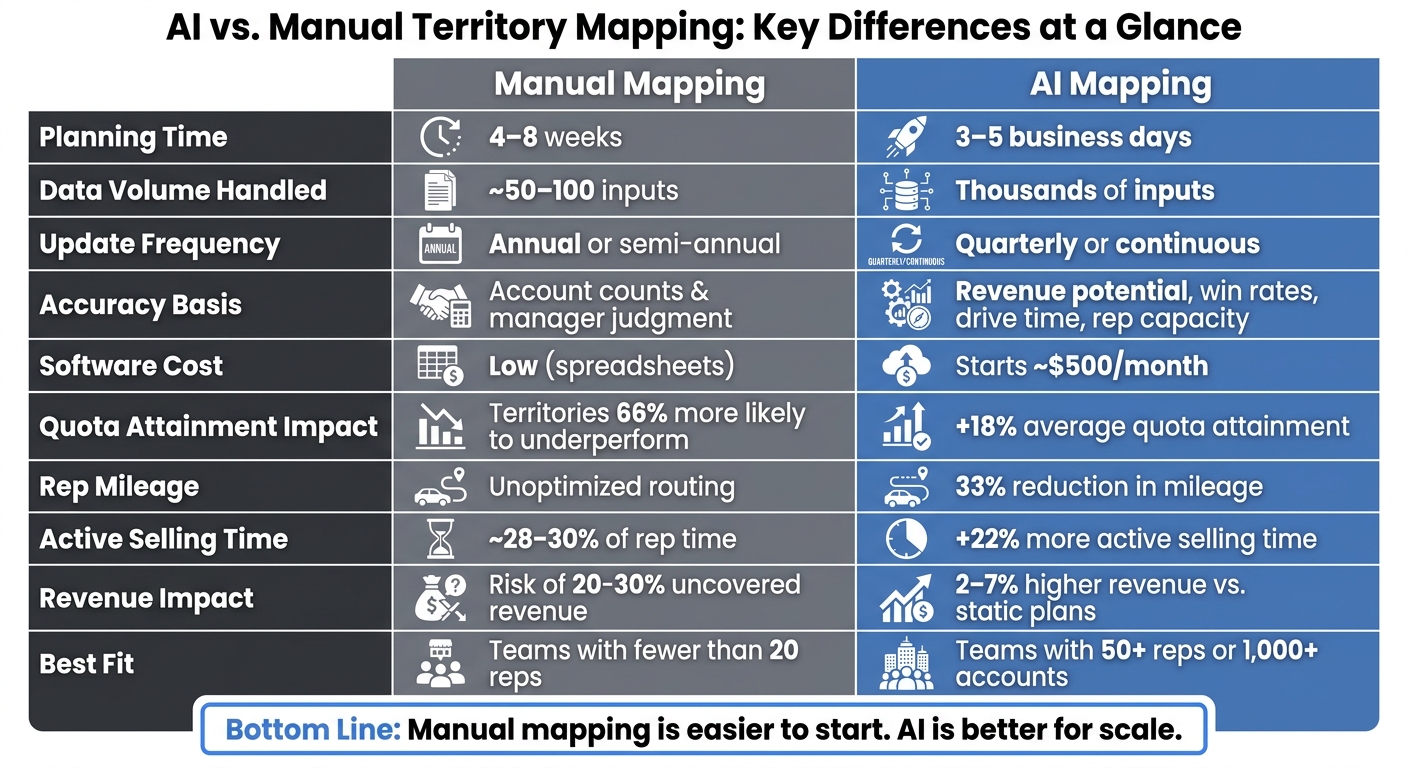
AI vs. Manual Territory Mapping: Key Stats Compared
AI Auto Territory Builder Overview | Build Smarter Sales Territories with Maptive IQ
sbb-itb-0ae5139
Quick Comparison
| Criteria | Manual Territory Mapping | AI Territory Mapping |
|---|---|---|
| How it works | Spreadsheets and manager decisions | Model-based territory planning |
| Planning time | 4–8 weeks | 3–5 business days |
| Data volume | About 50–100 inputs | Thousands of inputs |
| Accuracy method | Account counts and judgment | Revenue, capacity, win rates, drive time |
| Update pace | Annual or twice a year | Quarterly or more often |
| Cost pattern | Lower software cost, more labor time | Higher software cost, less manual work |
| Best fit | Small, steady teams | Larger or more complex teams |
Bottom line: if your team has 20 reps or fewer, manual mapping may still be enough. If you’re past 50 reps, above 1,000 accounts, or trying to balance more than a few factors at once, AI usually becomes the better option.
Manual Territory Mapping: How It Works and Where It Falls Short
Manual territory mapping usually begins with a CRM export into Excel or Google Sheets. From there, sales ops teams group accounts by ZIP code, state, or industry, then split them across reps using rough estimates of capacity and revenue potential. Color-coded maps are a common way to document the plan [1].
On the surface, that process seems simple enough. But it comes with tradeoffs that show up fast in coverage, routing, and rep workload. It can work when the team is small. Once the team or account base grows, though, the cracks start to show. Accuracy slips, updates take too long, and the admin work piles up.
Accuracy Limits of Manual Mapping
The biggest accuracy issue is pretty human: people can only juggle so many variables at one time before tradeoffs start getting missed [3][2]. A planner may try to balance geography, account count, and rough revenue potential. But things like travel time, rep expertise, and buying signals often get pushed aside. The result? Territories that seem balanced in a spreadsheet but feel uneven in the field.
In field sales, distance alone doesn’t tell the whole story. A 50-mile radius can mean one thing in rural Kansas and something very different in metro Chicago [9]. Urban reps may end up with fewer accounts they can actually reach in a day, while rural reps can get stuck covering far more ground than makes sense.
So even when a territory looks fair on paper, the work behind that plan is still heavy.
Speed and Labor Cost of Manual Mapping
Manual territory reviews usually take sales operations teams 4 to 8 weeks per cycle [4]. That’s a long stretch, and most of it goes into tedious cleanup work:
- cleaning CRM exports
- fixing address formats
- reconciling duplicate accounts
- building formulas
- running approval rounds with sales leadership
Because of that, midyear changes often get delayed until the next annual cycle. In plain English, the plan becomes a once-a-year project instead of something teams can adjust when the market shifts.
That delay carries a cost. Territories built without data-driven optimization are 66% more likely to underperform [5]. And companies that optimize territories on a regular basis see 2% to 7% higher revenue than companies that don’t [4][9]. If it takes months to fix a coverage gap, that revenue doesn’t just wait around.
Slow changes also create a mess inside the CRM.
CRM Workflow Problems Caused by Manual Updates
When territory assignments sit outside the CRM, ownership records split apart fast, dashboards go stale, and commission disputes tend to show up right behind them [5][2]. Syncing manual territory changes across CRM records and dashboards can take hundreds of hours [1].
That kind of drag helps explain why reps spend only 28% to 30% of their time selling [4].
This is the gap AI-driven territory mapping is meant to shrink.
AI-Driven Territory Mapping: Core Capabilities and Business Impact
AI fixes the scale problem by turning territory design into a model-driven process instead of a manual spreadsheet task. In plain English, it does the heavy lifting that manual mapping just can’t keep up with. Rather than having one planner sort rows in a spreadsheet, machine learning models can process revenue potential, travel time, past win rates, and rep capacity all at once. Then they turn that data into territory plans that are tough to build by hand.
Data Inputs That Drive Better Territory Decisions
AI territory models pull in many inputs at the same time. On the account side, that can include revenue history, company size, industry, ICP fit scores, and churn risk. On the performance side, models look at past win rates, average deal cycle length, and rep tenure. Geography goes past ZIP codes too. More advanced tools use actual drive times from mapping APIs instead of straight-line distance, which matters a lot for field sales capacity planning [2][3][10].
External market signals add another layer. Intent data, job postings, competitor density, and U.S. Census data on income and population density can help teams spot high-potential accounts that still aren’t in the CRM [2][12]. That’s a big deal. AI can weigh 10 to 20 variables at once, while human planners usually work with only a handful at a time [2].
Clean CRM data makes a big difference. AI models only work well when the data behind them is in good shape. Roughly 15% to 30% of account records in a typical CRM contain errors in address, industry, or revenue fields, so at least 80% of your records should be accurate before you run an AI model [4][2].
How AI Improves Accuracy, Speed, and Cost Control
For accuracy, AI uses multi-objective optimization to balance goals that often pull in different directions, like cutting travel time while keeping revenue parity across reps [7]. It can also line up rep experience with account types, so enterprise specialists spend time on the right deals [3]. Companies that use AI-driven territory management report an average 18% increase in quota attainment across their sales teams [11].
It also cuts down the time needed for redesigns and reduces the hours sales managers spend on manual rebalancing. In many cases, sales managers get back more than 40 hours per quarter that used to go into manual data slicing and replanning [11].
On cost, the gains stack up over time. Automated mapping cuts rep mileage by an average of 33% and increases active selling hours by 22% [7]. Organizations using dynamic territory management also see a 12% drop in rep turnover and 25% faster time-to-quota for new hires [11].
How CRM Copilot.AI Supports Better Territory Data
Clean territory data starts with clean CRM records. That’s the baseline. AI territory models are only as good as the data feeding them.
That’s where CRM Copilot.AI comes in. It helps teams verify and organize CRM data before a territory redesign. CRM Copilot.AI can verify contact data, filter records by location, industry, and company size, and sync updates into Salesforce, HubSpot, or Zoho.
AI vs. Manual Territory Mapping: Accuracy, Speed, and Cost Compared
Now that the mechanics are on the table, the trade-offs are much easier to spot. Manual mapping is cheaper at the start. AI, on the other hand, tends to do better on accuracy, speed, and rep productivity. The catch? It usually comes with more upfront software spend, even though labor costs tend to drop over time.
| Dimension | Manual Mapping | AI-Driven Mapping |
|---|---|---|
| Accuracy basis | Manager judgment, equal account counts | Revenue potential scores, rep capacity modeling |
| Planning speed | 4–8 weeks per cycle [4] | 3–5 business days [4] |
| Travel logic | ZIP codes or distance-only estimates [3][8] | Actual drive-time polygons via mapping APIs [3][8] |
| Software cost | Low; spreadsheets are included in office suites [6] | Starts around $500 per month for small teams; enterprise pricing scales up [11] |
| Data requirements | Basic CRM exports | Clean CRM data plus external intent and behavioral signals [4][2] |
| Ongoing management | Annual or semi-annual reviews [2] | Quarterly or continuous rebalancing [3][2] |
Accuracy: Balanced Coverage vs. Judgment-Based Assignments
The biggest accuracy issue with manual mapping is pretty simple: teams often aim for equal account counts instead of balanced revenue potential. On paper, that can look fair. In practice, it often gives reps very different workloads and very different chances to hit quota.
AI takes a different route. It models balanced revenue potential using propensity scoring and historical win rates [11][3]. That can lead to cleaner territory splits and fewer blind spots in coverage.
Still, AI isn’t magic. It can miss rep-level context that a manager knows by heart, like a long-standing client relationship or a short-term travel limit. That human context still matters, especially when a territory looks right in the data but feels off in the field.
And once accuracy slips, rebalancing gets harder later.
Speed and Agility: Multi-Week Reviews vs. Faster Re-Modeling
Manual reviews take time. A lot of it. AI can re-model the same territory in days instead of weeks. If a rep leaves, the system can suggest a rebalanced split within hours.
That kind of speed matters. It helps teams move faster when headcount changes, and it supports rep ramp-up. Organizations that use dynamic territory management see 25% faster time-to-quota for new hires [11].
In plain English: less waiting, less spreadsheet cleanup, and fewer delays when the sales team needs to act.
Faster re-modeling also chips away at the admin work that makes territory planning so expensive.
Cost: Labor-Heavy Planning vs. Higher Upfront Spend with Efficiency Gains
Manual mapping can look cheap because the software bill is low. But that view misses the labor behind it. RevOps and sales managers can spend weeks slicing data, cleaning files, debating splits, and reworking plans. That’s time that could go toward pipeline work instead.
AI flips that cost structure. Software spend goes up, but rework, travel waste, and admin time can go down. So the budget line changes, even if the total effort drops.
There’s also a revenue angle here. Teams that stick with static, manual designs risk leaving 20–30% of potential revenue uncovered because territories are distributed unevenly [11]. That’s the part many teams don’t see until they look back and realize some reps had too much while others had too little.
Choosing the Right Approach and Key Takeaways
Readiness Checklist for Moving to AI Territory Mapping
Once you understand the tradeoffs around accuracy, speed, and cost, the next step is simple: figure out if your team is ready.
Manual mapping makes sense for smaller teams with fewer than 20 reps, especially when human judgment matters more than data-based assignment. But after a team passes 50 reps, handles more than 1,000 accounts, or has to juggle more than three goals at the same time, spreadsheets often get hard to manage [7].
AI territory projects usually don’t fail because the model is weak. They fail because the data is messy [4]. So before you make the switch, your team should have the basics in place:
- CRM data accuracy of at least 80% – standardize address formats, fill in missing revenue figures, and fix industry classifications
- One primary optimization goal – decide whether you’re optimizing for revenue parity, account count, or travel time before running any model
- Account ownership standards – every account should have a clear owner before optimization
- Rep capacity limits – document how many accounts each rep type can handle in practice
- Quarterly review cadence – commit to territory checks every quarter instead of waiting for a once-a-year reset
CRM Copilot.AI can help verify and enrich CRM records before a territory redesign.
If your team can check these boxes, AI starts to look less like a big leap and more like the next sensible move.
Key Points to Remember
Manual mapping is simpler, but it has a limit. It works well for small, steady teams where human judgment adds clear value. But once things get more complex – more reps, more accounts, or more market movement – the time cost and accuracy issues start stacking up.
AI can help improve quota attainment, cut planning time, and reduce manual rework – but only if your CRM data is clean.
The right path usually comes down to three things: team size, territory complexity, and the actual cost of staying manual – including revenue that slips away when territories are uneven.
FAQs
When should a team switch from manual mapping to AI?
Teams should make the switch when territory planning gets too messy to handle by hand. That usually happens when you’re working across hundreds of accounts or trying to balance several moving parts at once, like revenue, drive time, and rep capacity.
It also makes sense to move to AI when spreadsheets start causing problems instead of solving them. Common signs include:
- Visibility gaps across territories
- Uneven workloads between reps
- Slow updates when plans change
- A need for faster scenario modeling
- A need for real-time adjustments
One thing matters before any switch: make sure your CRM data is clean. If the data is messy, the output will be too.
How clean does CRM data need to be for AI mapping to work well?
It doesn’t need to be perfect. But it does need to be high-quality.
A good target is at least 80% cleanliness. If accuracy drops below 60%, clean the data before you run any models.
Focus first on the fields that matter most: accurate addresses, current account statuses, and consistent revenue attribution. Then standardize geographic coding, industry tags, and firmographic details. If that data is off, you can end up with territory assignments that look right on paper but are flat-out wrong.
Can AI still work if managers want final control over territories?
Yes. AI works within rules set by managers, helping fine-tune territories based on variables, limits, and goals like revenue balance or geographic efficiency.
Managers still have the final say. They can review AI-generated scenarios and adjust them for real-world factors the math may miss, such as protected relationships, rep tenure, or internal team dynamics.