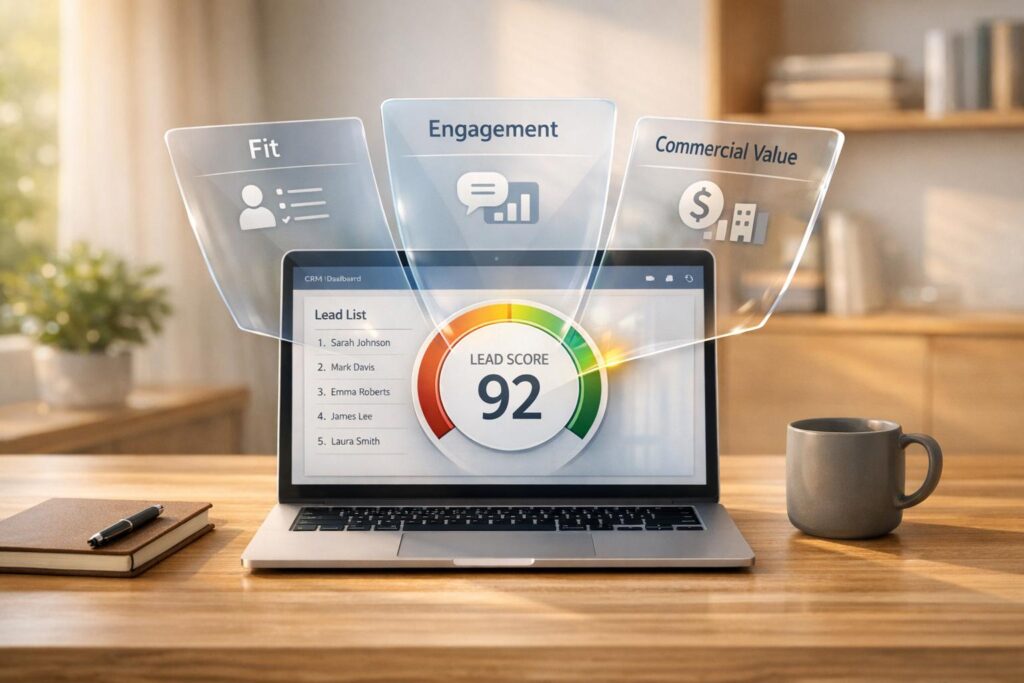
AI-driven lead scoring helps sales teams prioritize leads by assigning a probability score (0-100) based on data like company size, behavior, and intent. Unlike traditional methods, AI continuously updates predictions, improving accuracy. Key benefits include:
- Higher productivity: 20% boost in sales productivity in the first year.
- Revenue growth: 3.5x increase for companies using AI scoring.
- Cost savings: 33% reduction in cost per lead.
Key Metrics:
- Lead Fit: Matches leads to your Ideal Customer Profile (ICP) using factors like company size and job title relevance.
- Engagement: Tracks behaviors like email opens, website visits, and demo requests to gauge interest.
- Commercial Value: Evaluates financial potential with metrics like predicted deal size and lifetime value.
How to Succeed:
- Improve data quality: Clean, up-to-date CRM data boosts accuracy by 20-40%.
- Use feature engineering: Combine behavior and firmographic data for better predictions.
- Monitor and adjust: Regularly review and recalibrate your model to maintain performance.
Integrating scores into CRM workflows ensures actionable insights, automating tasks like lead assignment and outreach. Businesses using predictive scoring report 28% higher conversion rates and faster sales cycles.
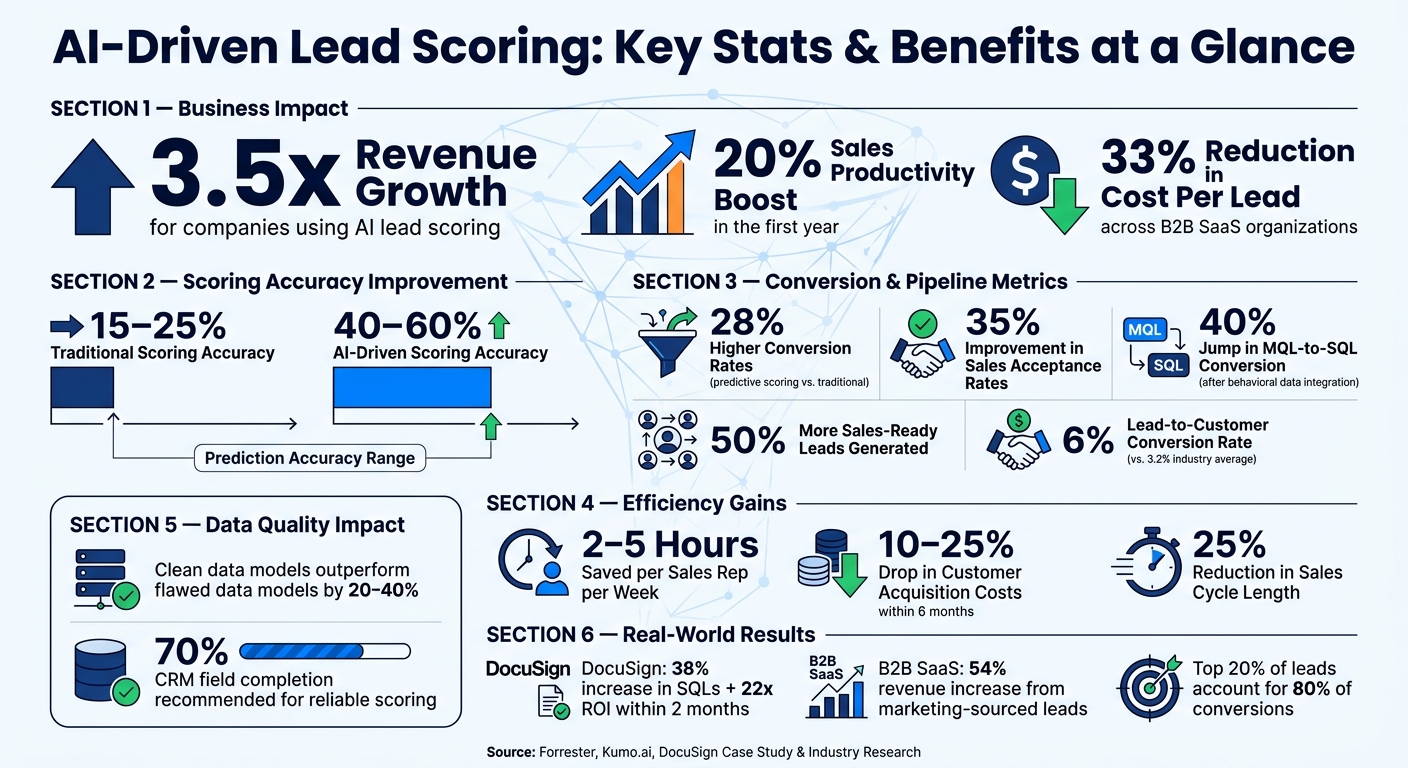
AI-Driven Lead Scoring: Key Stats & Benefits at a Glance
Using AI for Lead Scoring (AI for Business People Series)
sbb-itb-0ae5139
Key Metrics in AI-Driven Lead Scoring
AI-powered lead scoring systems group signals into three main categories: lead fit, engagement, and commercial value. Together, these metrics give sales teams a well-rounded view of each lead’s potential.
Lead Fit Metrics
Lead fit metrics evaluate how closely a lead aligns with your Ideal Customer Profile (ICP). Key indicators include:
- ICP match: This measures how well a lead’s firmographic data – such as industry, company size, and annual revenue – matches your target profile.
- Job title relevance: Filters out individuals who aren’t decision-makers.
- Account-level coverage: Assesses how many stakeholders within a company are actively engaged.
Since B2B purchases often involve multiple decision-makers, scoring an entire account rather than just individual leads provides a clearer view of deal readiness. Businesses using these metrics in predictive models tend to perform better: sales acceptance rates can improve by up to 35% compared to traditional rules-based models [3]. For instance, DocuSign achieved a 38% increase in Sales Qualified Leads (SQLs) and a 22x ROI within two months of implementing predictive scoring that prioritized fit metrics [4].
While fit metrics ensure alignment with your target audience, engagement metrics uncover a lead’s current interest and intent to buy.
Engagement and Behavioral Metrics
Once you’ve confirmed a lead fits your ICP, the next step is to measure their engagement. Behavioral signals such as website visits, content downloads, email interactions, form submissions, and demo requests reveal how interested a lead is in your product or service.
"AI lead scoring replaces static point systems. It works with real data in real time, reading behavior, fit, and timing to rank leads by true buying intent." – Kurt Uhlir, Author at Sure Send [6]
The timing and frequency of these actions are just as important as the actions themselves. For example, a lead who visits your pricing page three times in a week signals far more urgency than someone who opened a single email a month ago. When behavioral data is combined with firmographic signals, the accuracy of scoring models improves significantly – from the 15–25% range typical of traditional approaches to 40–60% with AI-driven systems [7]. One B2B SaaS company saw a 40% jump in MQL-to-SQL conversion rates after integrating behavioral data into its scoring process [5].
Commercial Value Metrics
The final piece of the puzzle is commercial value, which evaluates the financial potential of a lead. Key metrics in this category include:
- Predicted deal size: Uses company size, industry benchmarks, and historical data to estimate contract value.
- Sales cycle length propensity: Predicts how long the sales process is likely to take.
- Lifetime value (LTV) propensity: Estimates the total revenue a customer could generate over time.
One often-overlooked but powerful signal is relational data, such as whether someone from the same company has already converted.
"The strongest signals in lead scoring are relational. The colleague signal (someone at the same company converted) can increase conversion likelihood by 3–5x." – Kumo.ai [8]
Incorporating commercial value metrics ensures sales teams focus on leads with real revenue potential. For example, a lead from a small startup might score high on engagement but low on commercial value. Distinguishing between these scenarios is what sets a great scoring model apart from an average one.
How to Optimize AI Lead Scoring Metrics
Even the most advanced AI scoring model can falter if the data it relies on is flawed. Optimizing your model is an ongoing effort that focuses on improving data quality, designing better features, and regularly reviewing performance. By refining key metrics and processes, you can ensure your AI model remains accurate and effective.
Improving Data Quality for Better Scoring
The quality of your data has a bigger impact on your model’s performance than the algorithm itself. Issues like missing values, duplicate entries, inconsistent formatting, and outdated contact details can significantly undermine scoring accuracy. In fact, models trained on clean data outperform those with flawed data by 20–40% [9].
Before you even start building or tweaking your scoring model, it’s essential to conduct a data quality audit. Check for gaps in firmographic details, outdated job titles, and duplicates in your CRM – especially those with slight variations in names. Tools like CRM Copilot.AI can help by automatically verifying and updating contact and company data as it enters your system. This kind of proactive data management can lead to a 10–25% reduction in customer acquisition costs (CAC) within just six months [2].
Feature Engineering for Better Predictions
Raw data alone doesn’t translate into accurate predictions. Feature engineering – transforming raw inputs into meaningful variables – helps the model extract actionable insights. For example, instead of just tracking whether a lead visited your pricing page, you can create "velocity features" that measure the frequency and timing of those visits. A lead that visits multiple times in a short period likely signals higher intent compared to one who visits sporadically over a longer time.
Combining these behavioral signals with firmographic data into a composite score provides deeper context. A B2B SaaS company that adopted this approach saw a 54% increase in revenue from marketing-sourced leads and a 67% acceptance rate of marketing-qualified leads by their sales team [2]. By enriching your model with these nuanced features, you can significantly boost its predictive power.
Monitoring and Updating Your Scoring Model
Once your model is built, the work doesn’t stop there. Continuous monitoring is essential to keep up with changes in your market, buyer behavior, and product offerings.
"A lead scoring model is not a set-and-forget configuration. It is a living system that must be recalibrated as your product, market, and audience evolve." – Involve Digital [10]
To stay on track, review your model’s performance quarterly. Compare lead scores with actual conversion rates to ensure high-scoring leads are consistently closing. If they’re not, it’s a sign your scoring criteria may need adjustment. Techniques like recency decay, which reduces the weight of older engagement signals, can help your model prioritize recent interactions. Companies that actively monitor and retrain their models typically see a 15–20% revenue boost within 18 months of implementing AI-driven lead scoring [11].
Integrating Lead Scoring into CRM Workflows
Once you’ve fine-tuned your AI scoring model, the next step is integrating those scores into your CRM workflows. This is where the real value lies – using lead scores to guide sales actions and streamline processes.
Mapping Lead Scores to CRM Systems
Most modern CRMs allow you to create custom fields to display lead scores directly within contact records. For instance, Salesforce enables reps to view Einstein scores alongside lead and opportunity data. HubSpot allows users to filter contact lists by score ranges, making it easy to segment leads. Zoho CRM takes it further with custom scoring fields that can trigger layout rules to spotlight high-priority leads automatically.
Having lead scores visible in your CRM ensures they’re actionable. Tools like CRM Copilot.AI integrate effortlessly with platforms like Salesforce, HubSpot, and Zoho. These tools enrich contact records with verified data, ensuring your scoring model is always working with accurate, up-to-date inputs. With scores mapped in your CRM, automated workflows can take over, triggering the next steps in your sales process without manual intervention.
Automating Workflows Based on Lead Scores
Once scores are in place, you can set thresholds to automate actions, removing the need for manual handoffs. Here’s a common framework used by B2B sales teams:
| Score Tier | Label | Automated Action | Timing/SLA |
|---|---|---|---|
| 80–100 | HOT | Assign to senior AE; trigger 2-touch phone and LinkedIn sequence | 4-hour routing [2] |
| 60–79 | WARM | Start a personalized email sequence followed by an SDR call | Within 3 business days [2] |
| 40–59 | NURTURE | Launch a marketing-led educational drip campaign | Weekly re-evaluation [2] |
| 0–39 | COLD | Archive or send a quarterly newsletter; remove from pipeline | N/A [2] |
This kind of automation not only speeds up lead assignment but also shortens your sales cycle. According to Forrester, businesses using predictive scoring see a 28% boost in conversion rates and a 25% reduction in sales cycle length compared to traditional methods [2].
"If your CRM automation doesn’t change the next action, the ‘AI score’ is just a number that burns attention." – Rivulet IQ [13]
Using Scores to Guide Multi-Channel Outreach
Lead scores can also shape your outreach strategy, helping you decide when and how to engage with prospects. For example, high-scoring leads (80–100) might warrant immediate action, such as a phone call and a personalized LinkedIn message within four hours. On the other hand, mid-tier leads (40–59) might be better suited for an educational email campaign managed by your marketing team.
AI models that offer explainability features can add even more value by showing why a lead received a particular score. For instance, if a lead has repeatedly visited your pricing page, a sales rep could say, "I noticed you’ve been exploring our pricing options – let me share how we’ve helped similar companies." This level of personalization can make a big difference. Since sales reps often spend 60% of their time on leads that don’t convert [1], focusing on score-driven outreach ensures their efforts are directed toward the prospects most likely to close.
Conclusion and Key Takeaways
Recap of AI-Driven Lead Scoring Benefits
AI-driven lead scoring is reshaping how sales and marketing teams prioritize their efforts. By focusing on the top 20% of leads that account for 80% of conversions[1], teams can work smarter, not harder. Companies leveraging advanced AI scoring methods report generating 50% more sales-ready leads while reducing the cost per lead by 33%. Top-performing teams using AI achieve a 6% lead-to-customer conversion rate, nearly double the industry average of 3.2%[10].
The productivity boost is hard to ignore. AI cuts down manual qualification efforts, saving each sales rep around 2 to 5 hours per week. Many organizations also experience a 10%–25% drop in customer acquisition costs (CAC) within six months of implementation[2]. As Kumo.ai puts it:
"Lead scoring is not a marketing automation nicety. It is the difference between a sales team that hits quota and one that burns out chasing dead leads."[1]
These stats highlight how AI-driven lead scoring can transform sales outcomes, offering a clear path to better efficiency and results.
Next Steps for Getting Started
To implement AI-driven lead scoring effectively, a structured 90-day plan is key. Here’s a breakdown:
- Days 1–30: Align your sales and marketing teams on the Ideal Customer Profile (ICP) and audit your CRM data. For reliable scoring, ensure at least 70% of your CRM fields are complete[2].
- Days 31–60: Train your model using data from the last 24 months of closed-won deals.
- Days 61–90: Launch a pilot, train your sales team, and fine-tune the model as needed[10][12].
If your team lacks in-house data science expertise, start with tools built into your CRM, such as Salesforce Einstein or HubSpot’s predictive scoring. For organizations needing accurate, up-to-date contact data, tools like CRM Copilot.AI integrate with platforms like Salesforce, HubSpot, and Zoho to enrich records in real time.
From the get-go, it’s critical to track model performance. Schedule quarterly reviews to compare predicted win rates with actual results. As market dynamics shift and product lines evolve, regular recalibration is essential to keep your model delivering accurate insights[2][12].
FAQs
What data do I need to start AI lead scoring?
To kick off AI-driven lead scoring, you’ll need to focus on three essential data types:
- CRM data: This includes information like contact records, deal stages, and communication logs. It’s crucial to ensure this data is accurate and up-to-date, as incomplete or incorrect CRM data can derail the model’s performance.
- Behavioral data: Think of metrics like website visits, email interactions, and demo sign-ups. These actions provide insight into how engaged a lead is with your brand.
- Third-party enrichment: Additional data, such as firmographics, demographics, or technographics, can give more context to your leads, helping the model make better predictions.
Start by auditing your CRM to make sure your foundation is solid – good data is the backbone of effective AI models.
How do I set score thresholds for HOT/WARM/NURTURE leads?
To define thresholds, dive into your historical CRM data to identify score ranges that correlate with successful conversions. Using CRM Copilot.AI, you can assign categories such as Hot (e.g., 80–100) for leads that need immediate attention and Nurture (e.g., 20–50) for those suited to automated follow-up sequences. Regularly revisit and fine-tune these thresholds, ensuring they align with actual results and help you focus on the leads most likely to convert.
How often should I retrain and recalibrate the model?
AI models need consistent retraining to maintain their performance. Without this, their effectiveness can drop by 30–40% in just six months. To stay ahead, many systems stick to a retraining schedule of 90 to 180 days, with some choosing quarterly updates to align with changing market conditions. Tools like CRM Copilot.AI take this a step further by using real-time data enrichment and feedback loops, helping your model stay responsive to shifting buyer behaviors and emerging data patterns.