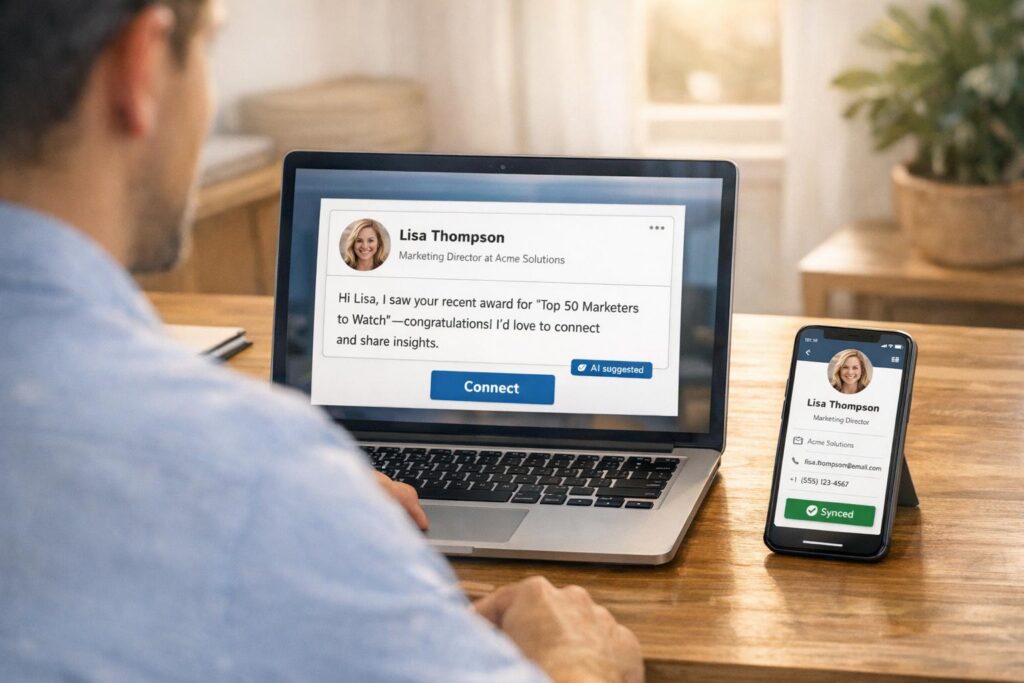
Sending generic LinkedIn connection requests rarely works. AI tools, like CRM Copilot.AI, are changing this by automating tailored outreach that feels personal. Here’s what you need to know:
- Personalized requests have a 55% higher acceptance rate than generic ones.
- AI analyzes LinkedIn profiles to identify details like job changes or shared connections, crafting messages in under 30 seconds.
- AI-powered campaigns boost engagement by 40%, saving users up to 2 hours daily.
- CRM Copilot.AI integrates with LinkedIn Sales Navigator and CRMs to streamline outreach and track leads effectively.
AI doesn’t just save time – it ensures your messages are relevant, improving connection rates and building meaningful professional relationships.
How AI Increases LinkedIn Connection Acceptance Rates
Why Personalization Matters in Professional Networking
In a world of constant cold messages, generic connection requests often get ignored. Personalization, however, stands out. In fact, 78% of companies using social selling outperform those that don’t [3]. The secret? Tailored communication.
Acknowledging a recent article, shared connection, or achievement in your message creates a sense of reciprocity. It shows you’ve taken the time to understand the recipient, rather than lumping them into a mass outreach effort. This approach pays off – individualized InMails have response rates 15% higher than generic ones [3]. And when LinkedIn InMail messages stay under 400 words and remain relevant, they achieve a 22% higher response rate [3].
On the flip side, cookie-cutter templates that simply insert a name (e.g., "Hi {{First Name}}") come across as impersonal and often fall flat [3]. This is where AI steps in, helping users craft messages that feel authentic while scaling outreach efforts.
How AI Automates and Improves Personalization
The biggest challenge with personalized outreach is time. AI tools solve this by creating tailored, engaging messages in under 30 seconds [3]. They do this by analyzing massive amounts of data that would be impossible for a person to process at scale.
AI digs into LinkedIn profiles to identify intent signals like promotions, job changes, funding announcements, product launches, or hiring trends [5]. It also pulls insights from posts, comments, career milestones, shared connections, and endorsements [2][5]. This level of detail transforms basic personalization into hyper-personalization, referencing achievements, mutual connections, or even specific challenges that resonate with the recipient [3].
The process often follows a "human-in-the-loop" model, where AI drafts about 70% of a message based on data, leaving room for human review to fine-tune tone and accuracy [5]. This step is critical because 62% of B2B buyers can identify AI-generated messages [2]. By blending AI efficiency with human oversight, the outreach feels genuine. AI can even adjust the tone and style of a message to align with the recipient’s communication preferences, making it feel more like a personalized conversation than a mass email [3][5].
| Message Component | AI Advantage | Impact |
|---|---|---|
| Subject Line | Analyzes emotional tone | Boosts open rates [2] |
| Opening Hook | Customizes based on profile insights | Increases response rates [2] |
| Value Proposition | Tailors to industry-specific challenges | Enhances engagement [2] |
| Call to Action | Tests and optimizes phrases via A/B testing | Drives higher conversions [2] |
AI doesn’t just stop at crafting messages. It categorizes prospect behavior – like profile views or content interactions – and times outreach for when recipients are most active. This strategy alone can boost response rates by 23% [2]. The result? Outreach that feels personal and thoughtful, yet scales effortlessly.
Automate LinkedIn Connections – Hyper-personalized with AI!
Step-by-Step Guide: Creating AI-Personalized LinkedIn Requests
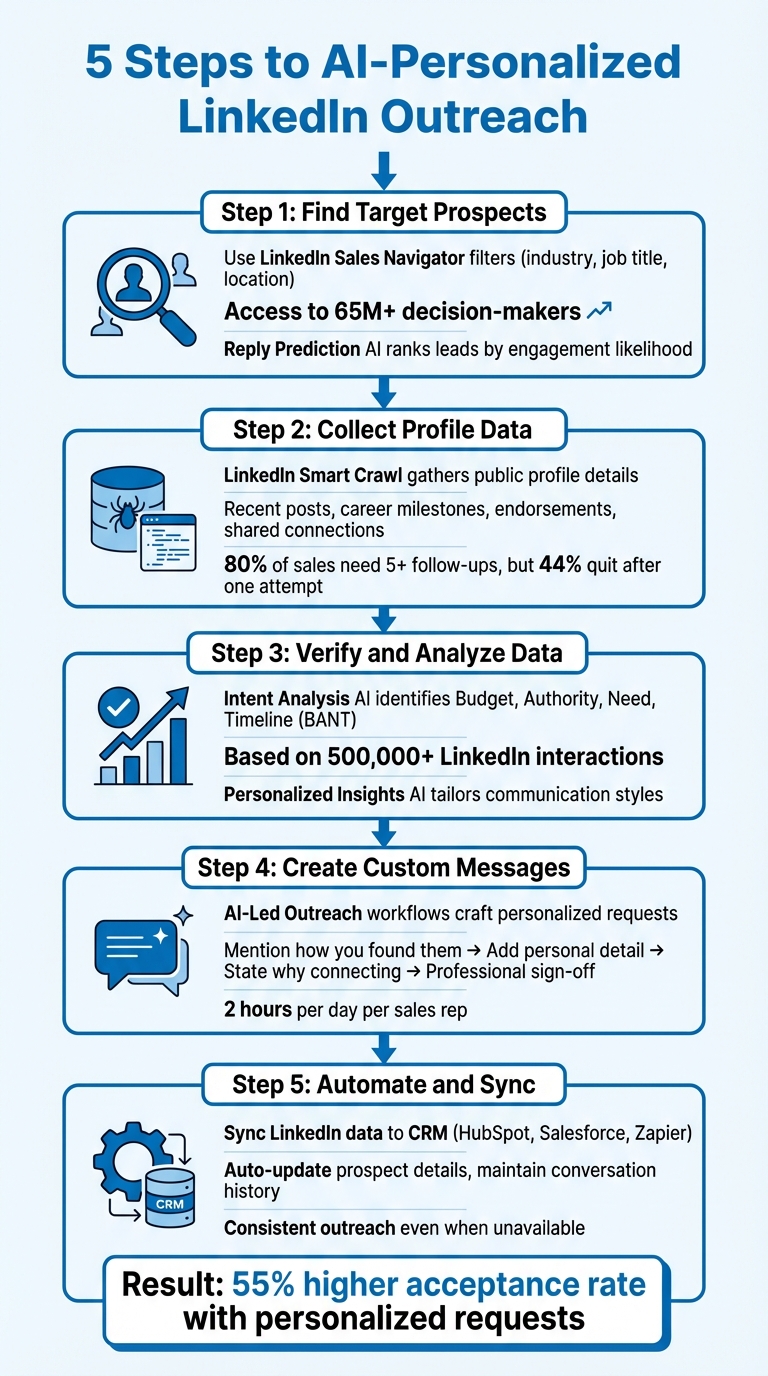
5-Step Process for Creating AI-Personalized LinkedIn Connection Requests
You don’t need to be a tech wizard to turn AI personalization into a practical tool. CRM Copilot.AI simplifies the entire process – from identifying prospects to syncing conversations with your CRM – into five easy-to-follow steps. Here’s how to make AI-driven personalization work for you.
Step 1: Find Target Prospects with CRM Copilot.AI
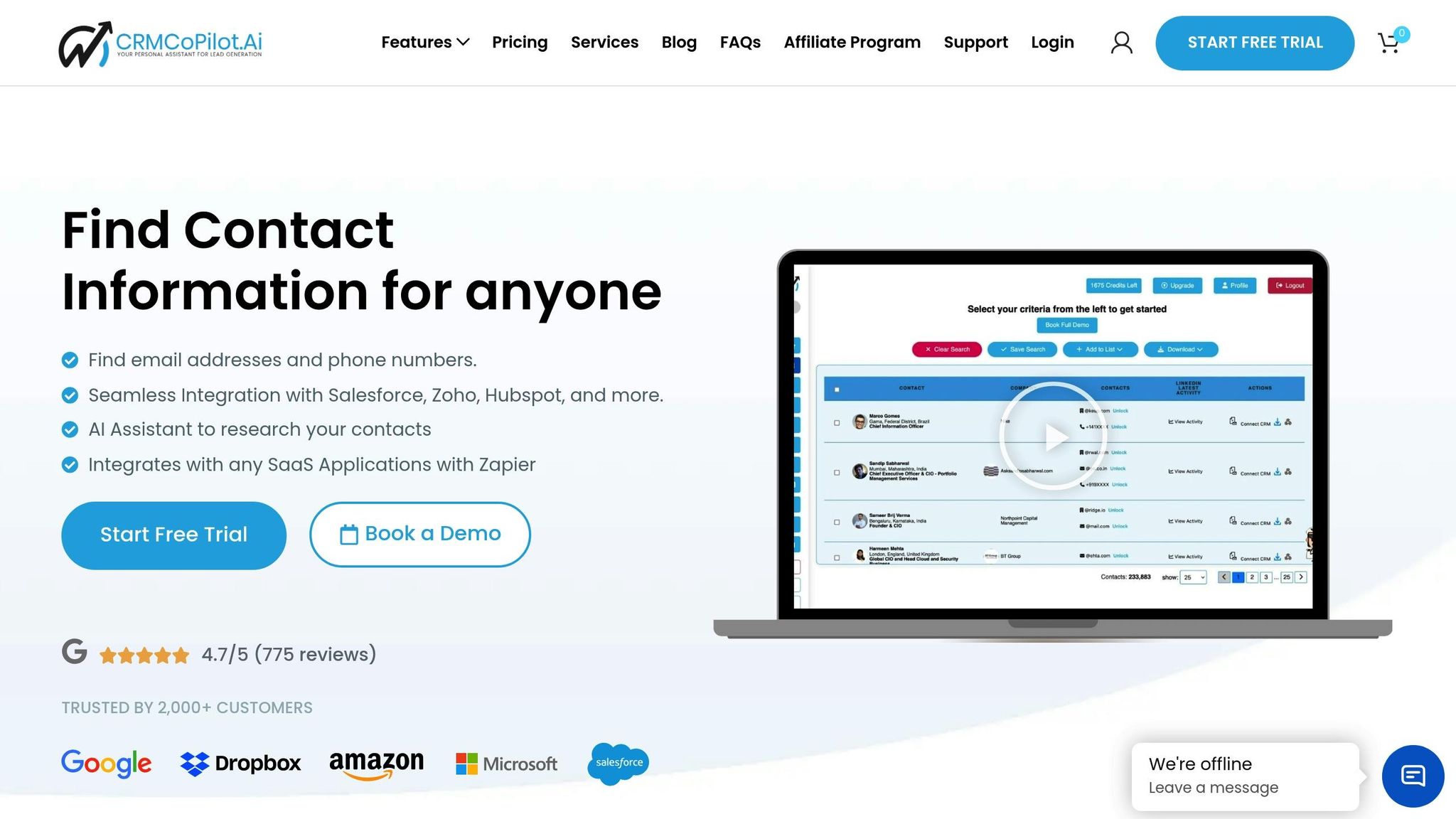
Start by identifying your ideal prospects using CRM Copilot.AI in combination with LinkedIn Sales Navigator filters like industry, job title, and location [6]. The Lead Filtering feature lets you zero in on qualified decision-makers, avoiding unproductive leads [9]. With access to over 65 million decision-makers on LinkedIn [8], precision is key.
Want to make your outreach even more effective? Use advanced filters like "Open Profiles" or "Shared Experiences" to find leads with whom you have a connection [8]. This ensures your initial outreach feels relevant. Plus, CRM Copilot.AI keeps your data fresh by automatically updating details like job titles and locations, unlike static spreadsheets that quickly go out of date [4].
To help you prioritize, the Reply Prediction AI ranks leads based on how likely they are to engage, so you can focus on prospects most ready to respond [9].
Step 2: Collect Profile Data Using LinkedIn Smart Crawl
Once you’ve identified your target prospects, LinkedIn Smart Crawl gathers public profile details, such as recent posts, career milestones, endorsements, shared connections, and achievements [4]. This data is the foundation for crafting messages that feel personal and thoughtful.
A centralized dashboard gives you a clear overview of your connections and helps you strategically time your outreach [8]. Considering that 80% of sales require at least five follow-ups, but 44% of salespeople quit after just one attempt [8], staying organized can make all the difference.
Pro tip: Avoid automating outreach on a brand-new LinkedIn account. Build your profile and connections manually first to reduce the risk of being flagged for spam [6].
Step 3: Verify and Analyze Data for Personalization
Data alone isn’t enough – it has to be meaningful. CRM Copilot.AI’s Intent Analysis AI digs into the information you’ve gathered to uncover key insights like Budget, Authority, Need, and Timeline (BANT), helping you understand where prospects are in their buying process [10]. These insights are based on over 500,000 LinkedIn interactions, giving you a proven framework for creating effective messages [6].
The Personalized Insights AI takes things further by tailoring communication styles to each prospect. It highlights shared interests, recent promotions, job changes, and professional milestones. Deduplication features also prevent team members from accidentally contacting the same leads, ensuring smooth collaboration [9].
Step 4: Create Custom Messages Using AI Workflows
With verified data ready, CRM Copilot.AI helps you craft personalized connection requests through its AI-Led Outreach workflows [10]. A simple yet effective framework includes:
- Mentioning how you found the prospect
- Adding a personal detail to establish common ground
- Clearly stating why you’re connecting
- Signing off professionally [1]
The Smart Reply AI feature offers flexibility, letting you automate the drafting process while still allowing for personal review. This balance ensures your messages feel authentic.
"CoPilot AI created a way for me to meet people and get access to their network and get to more potential customers in a way that doesn’t irritate them or push them away."
– Thad Butterworth, Hill City Technologies [9]
Each message includes a clear call to action, encouraging recipients to respond immediately. By automating the drafting process, the platform saves representatives an average of 2 hours per day while maintaining high-quality outreach [10].
Step 5: Automate Sending and Sync with Your CRM
Finally, sync all your LinkedIn data – connections, conversations, and meetings – directly into your CRM, whether it’s HubSpot, Salesforce, or another platform via Zapier [10][7]. This integration keeps all communication and relationship history in one place, automatically updating prospect details as they change [4].
Automated workflows ensure that conversations continue even when you’re unavailable, keeping your outreach consistent and efficient [10].
"CoPilot AI brings me extra introductions every week that I just wouldn’t be able to get in-person or manually. If I could do this ten times over, I would because it produces results."
– Aaron Curry, Catalyst Financial Group [10]
sbb-itb-0ae5139
CRM Copilot.AI Pricing for LinkedIn Automation
CRM Copilot.AI offers pricing plans tailored to different outreach volumes and automation requirements. Costs depend on the number of monthly lead and phone credits. All paid plans come with essential AI-powered features.
The Free plan is ideal for testing, offering 20 email credits at no cost. It’s a simple way to explore basic lead generation without any financial commitment.
For teams looking to expand, the Silver plan costs $55 per month and includes 1,000 email credits and 75 phone credits (equivalent to 15 phone numbers). This averages out to about $0.051 per lead. The Gold plan, priced at $95 per month, provides 2,000 email credits and 100 phone credits (20 numbers), reducing the cost to $0.045 per credit.
Larger teams with higher outreach needs can opt for the Platinum plan at $250 per month (billed annually). This plan includes 5,000 email credits and 250 phone credits (50 numbers). Across all paid plans, users report saving approximately 2 hours daily per sales representative and achieving returns of up to $29.56 for every $1 spent [10][11].
Free, Silver, Gold, and Platinum Plans Compared
| Feature | Free | Silver | Gold | Platinum |
|---|---|---|---|---|
| Monthly Price | $0 | $55 | $95 | $250 (Annual) |
| Monthly Lead Credits | 20 | 1,000 | 2,000 | 5,000 |
| Phone Credits (Numbers) | 0 | 75 (15) | 100 (20) | 250 (50) |
| Avg. Cost Per Credit | $0.00 | $0.051 | $0.045 | $0.048 |
| LinkedIn Smart Crawl AI | No | Yes | Yes | Yes |
| AI Personalization (SalesNav) | No | Yes | Yes | Yes |
| Ask Your CoPilot (AI Assistant) | No | Yes | Yes | Yes |
| CRM Integration | No | Yes | Yes | Yes |
| LinkedIn Profile Data in Leads | No | Yes | Yes | Yes |
This pricing structure supports a personalized, data-driven approach to LinkedIn outreach. However, to get the most out of these features, you’ll need a LinkedIn Sales Navigator subscription for precise targeting. It’s also important to stay within LinkedIn’s monthly messaging limits – typically around 600 connection messages and 800 nurture messages – to maintain account health. When starting with a new account, take it slow to avoid triggering spam warnings [11].
Next, we’ll explore strategies to ensure your AI-generated messages feel authentic and resonate with your audience.
Best Practices for AI-Generated Connection Requests
Keeping Automated Messages Personal and Genuine
AI can help draft messages, but giving them a personal touch is what makes them resonate. The best results come from combining AI’s research capabilities with a human review to ensure the message feels authentic and thoughtful [12].
A helpful framework for crafting these messages is the "Head, Heart, Hands, and Heels" method. Here’s how it works:
- Head: Start by introducing yourself and mentioning how you came across their profile.
- Heart: Add a personal detail, like referencing a recent post they shared or an event they attended.
- Hands: Clearly state your reason for reaching out or how you’d like to connect.
- Heels: Wrap up professionally and include your name.
Including specific details, such as a recent promotion, a shared connection, or a company milestone, can make a huge difference. Messages that reference these details have a 69% acceptance rate, while generic requests only see about 15% acceptance [2][12]. Keep your message concise – aim for 200–250 characters [12].
Lastly, make sure your profile is polished. Use a professional photo and highlight your value proposition clearly [1][7].
Common Mistakes to Avoid in AI Outreach
A common pitfall in AI-driven messaging is relying too heavily on templates without adding personalization. Simply inserting a name isn’t enough. In fact, 87% of LinkedIn connection requests don’t include any personalized message, which means generic AI-generated text often gets ignored [12]. To stand out, human oversight is key to ensure the message feels genuine [2].
Another major misstep is leading with a sales pitch in your first message. This approach can turn prospects away or even get you blocked [1][4]. Instead, focus on offering value – acknowledge their work or share a relevant resource before making any requests.
Avoid sending messages indiscriminately to anyone who appears in your search results. This scattershot approach can harm your reputation and drastically lower response rates [4]. Instead, refine your prospect list with tools like Boolean operators in Sales Navigator to ensure your outreach is targeted and relevant [2].
Timing and frequency also matter. Sending requests on weekends or late at night reduces visibility. For better results, aim to send messages on Tuesdays or Wednesdays between 9:00 AM and 4:00 PM [2]. When following up, wait 3–4 days between messages, and double-check names and company details to avoid embarrassing mistakes [1][12].
Conclusion
AI-powered tools like CRM Copilot.AI are changing the game for LinkedIn networking by automating tasks that used to take up a staggering 64.8% of a sales professional’s day [13]. With the ability to process over 500 leads per hour [14], these tools are a huge time-saver.
The impact goes beyond just speed. AI-driven personalization has been shown to increase response rates by an impressive 400% [2]. On top of that, these tools can free up more than 10 hours per week, making lead generation not only faster but also far more efficient than traditional manual methods [13][14].
CRM Copilot.AI takes things further by automating key processes like prospect identification, contact verification, and syncing with your CRM. Its LinkedIn Smart Crawl feature, included in Gold and Platinum plans starting at $95/month, dives into profile data and recent activity to create genuine, tailored messages while staying within LinkedIn’s messaging limits [14][15].
FAQs
How does AI create personalized LinkedIn connection requests?
AI helps craft personalized LinkedIn connection requests by analyzing key details from a recipient’s profile – like their job title, company, skills, or even recent activity such as posts or comments. It also identifies shared connections or mutual interests to create messages that feel relevant and thoughtfully tailored.
For instance, AI might reference a recent achievement highlighted on the recipient’s profile or bring up a shared professional interest. This kind of customization not only saves you time but also boosts your chances of starting meaningful conversations and building stronger connections.
How can I make AI-generated LinkedIn connection requests feel genuine?
To make your LinkedIn connection requests feel genuine, mix automation with a personal touch. Use AI to handle repetitive elements, like adding names or job titles, but always include something specific to the recipient. For example, reference a recent accomplishment, a mutual connection, or an industry topic they’re interested in.
Take a moment to explore their profile, check for company news, or identify shared interests. This helps you write a message that feels thoughtful and relevant. Keep it short and to the point, highlighting value right away, and steer clear of anything that sounds too generic. Finally, pay attention to how people respond and adjust your approach as needed to keep your outreach effective and engaging.
How does CRM Copilot.AI improve LinkedIn connection requests?
CRM Copilot.AI leverages advanced AI technology to help you write personalized LinkedIn connection requests that truly resonate. By examining details like a prospect’s professional history and interests, it enables you to craft messages that feel authentic and tailored to each individual.
Beyond just messaging, the platform simplifies your outreach efforts by organizing leads, automating follow-ups, and handling engagement – all within a single dashboard. This not only saves you time but also boosts your chances of forming genuine connections on LinkedIn.